

Pseudocode is your stepping stone to proper programming - it's... Show more
 Biology
 Sociology
Sign up to see the contentIt's free!
Access to all documents
Improve your grades
Join milions of students
By signing up you accept Terms of Service and Privacy Policy

Biology

Chemistry
AP Chemistry

English
AP English Literature
449
•
Dec 22, 2025
•
Pseudocode is your stepping stone to proper programming - it's... Show more
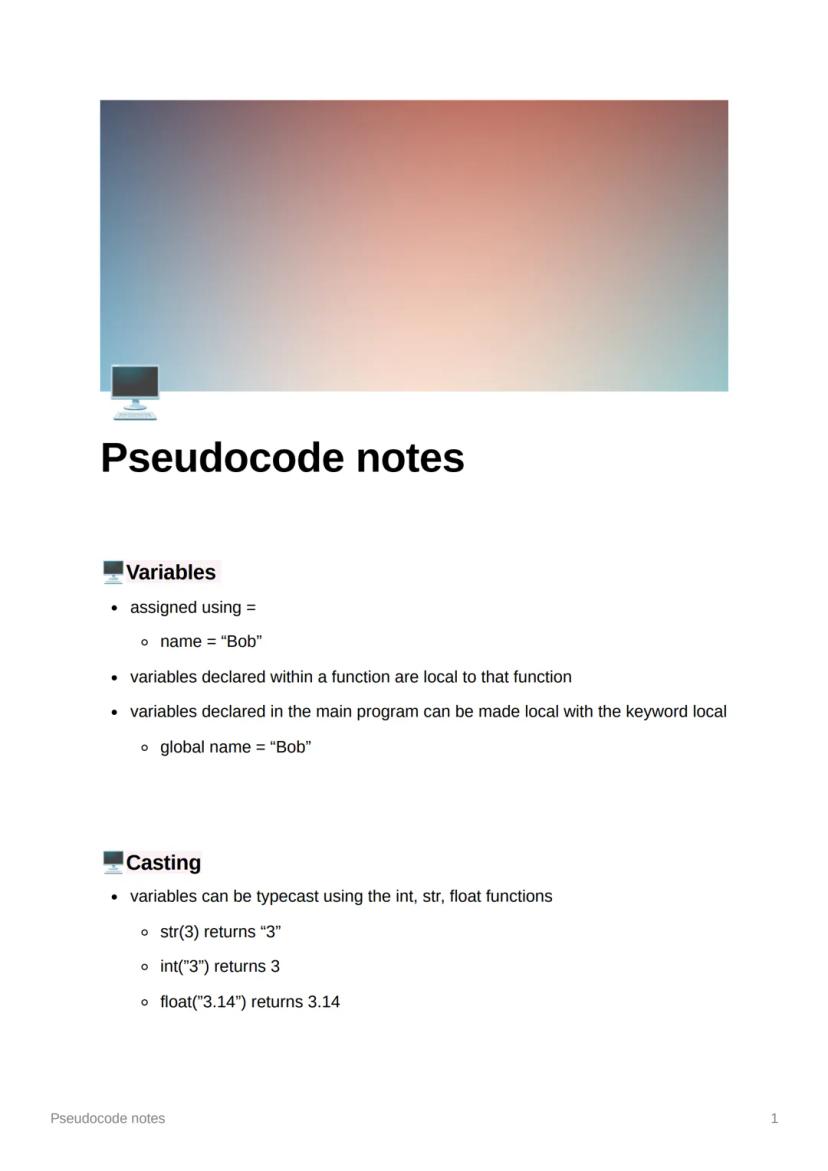
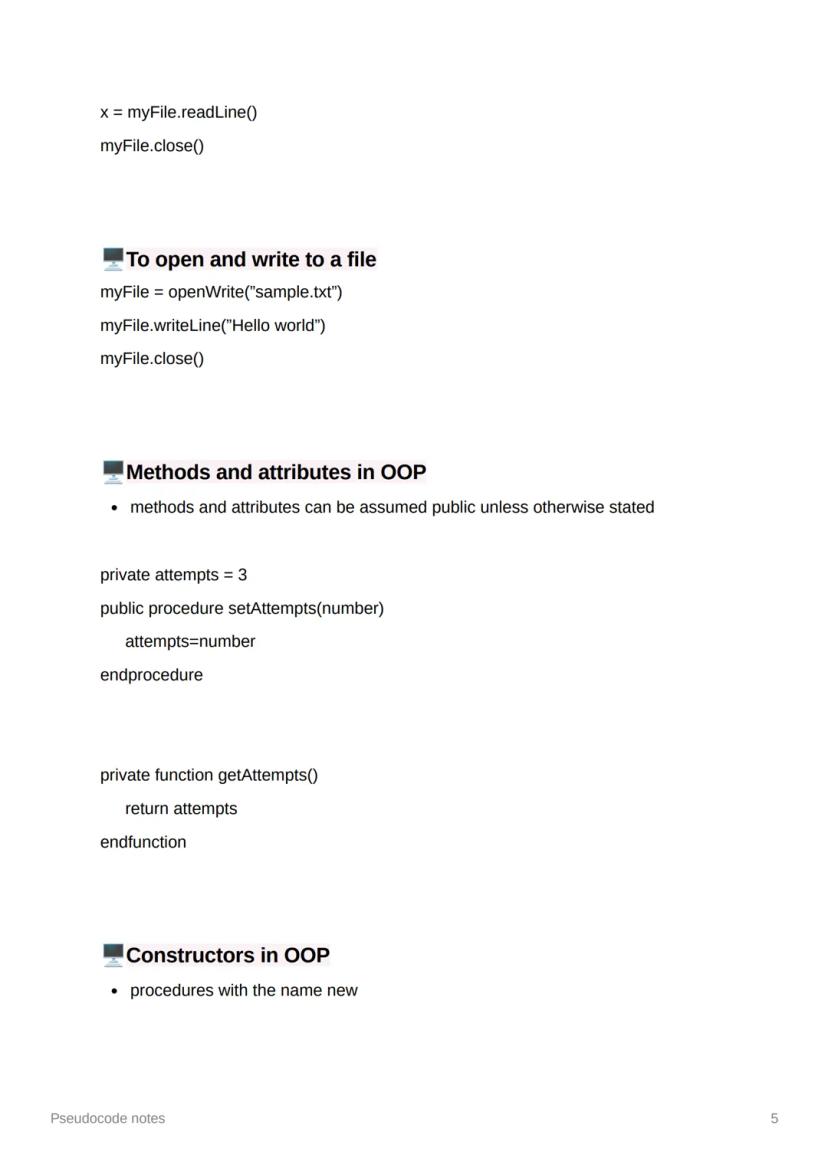
Getting comfortable with variables is absolutely crucial - they're basically containers that store information your program needs to remember. You create them using the equals sign, like name = "Bob", and it's that simple.
Here's something important to remember: variables created inside a function stay local to that function (they can't be used elsewhere). However, if you want to make a variable from your main program local to a specific function, just use the local keyword, or make it available everywhere with global.
Casting lets you convert between different data types, which you'll use constantly. The functions str(), int(), and float() are your best mates here - str(3) gives you "3", whilst int("3") gives you the number 3.
Quick Tip: Think of casting like translation - you're converting data from one "language" (type) to another so different parts of your program can understand it.
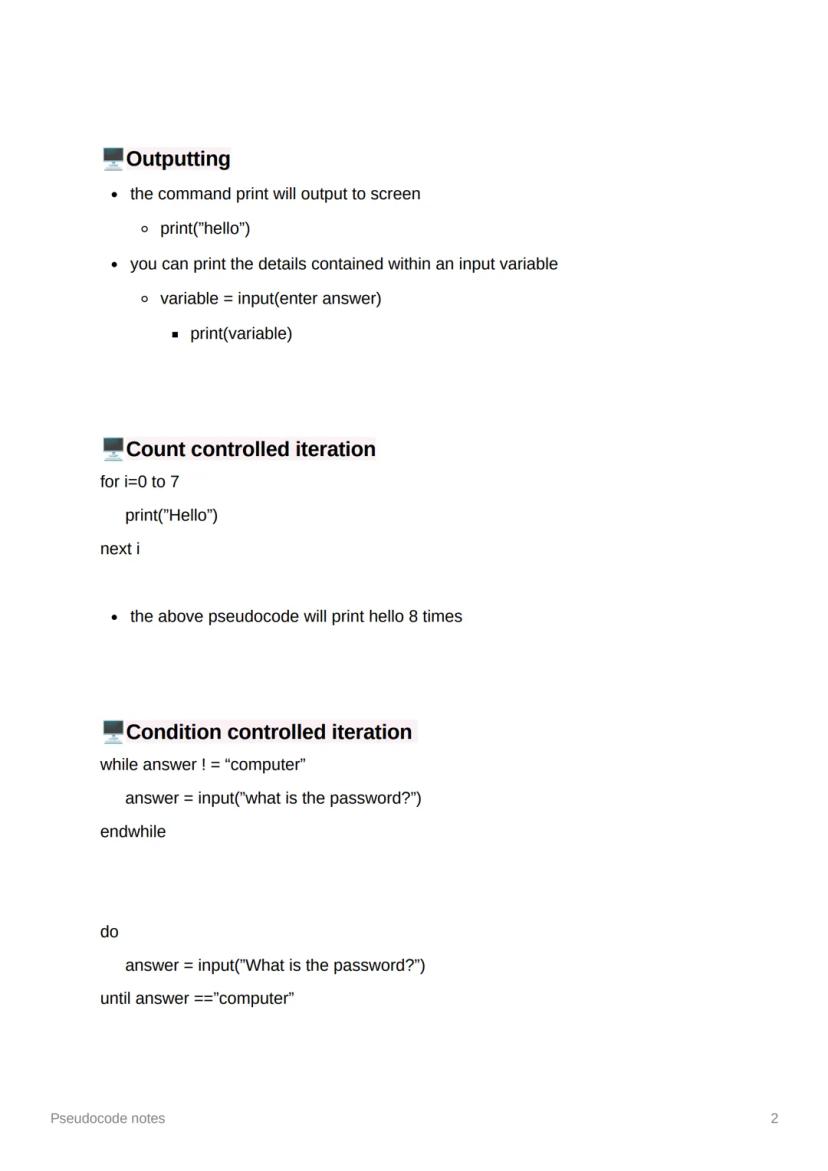
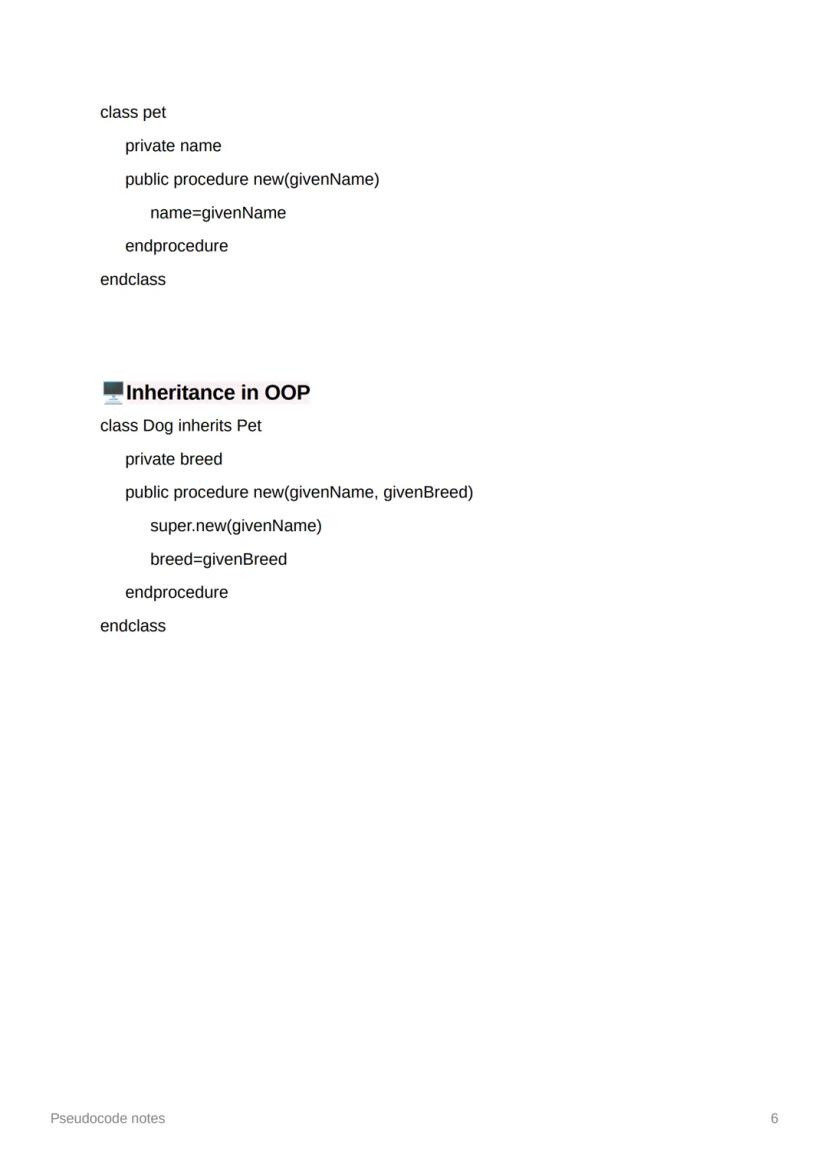
The print command is your window to the world - it displays whatever you want on screen. You can print text directly with print("hello") or show what's stored in a variable by printing the variable itself.
Count controlled iteration (for loops) runs a specific number of times. The example for i=0 to 7 actually runs 8 times because it includes both 0 and 7 - this catches loads of students out in exams!
Condition controlled iteration keeps going until something changes. While loops check the condition first, then run the code. Do-until loops run the code first, then check - this guarantees the code runs at least once, which is sometimes exactly what you need.
Remember: Count when you know how many times, condition when you're waiting for something to happen!
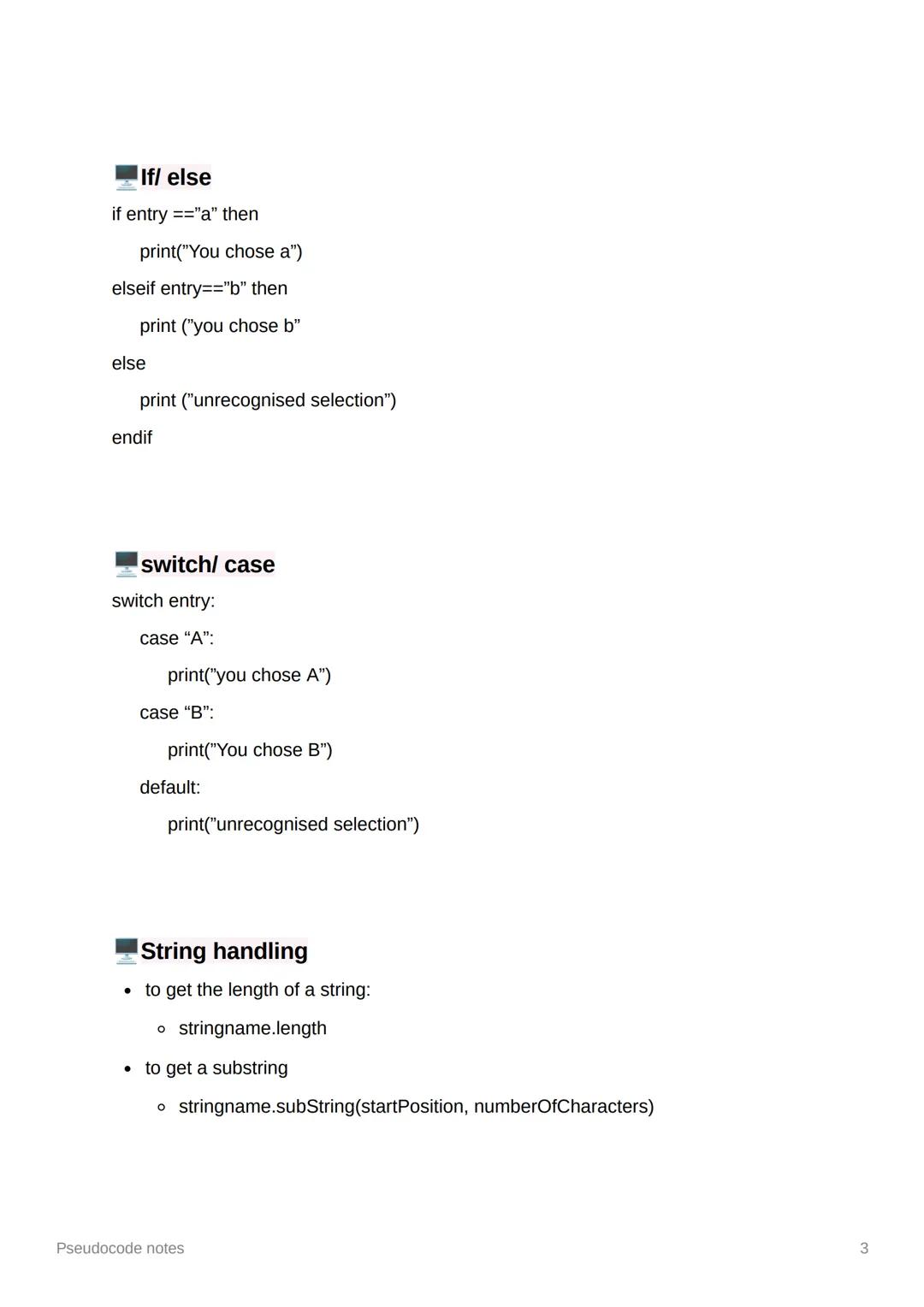
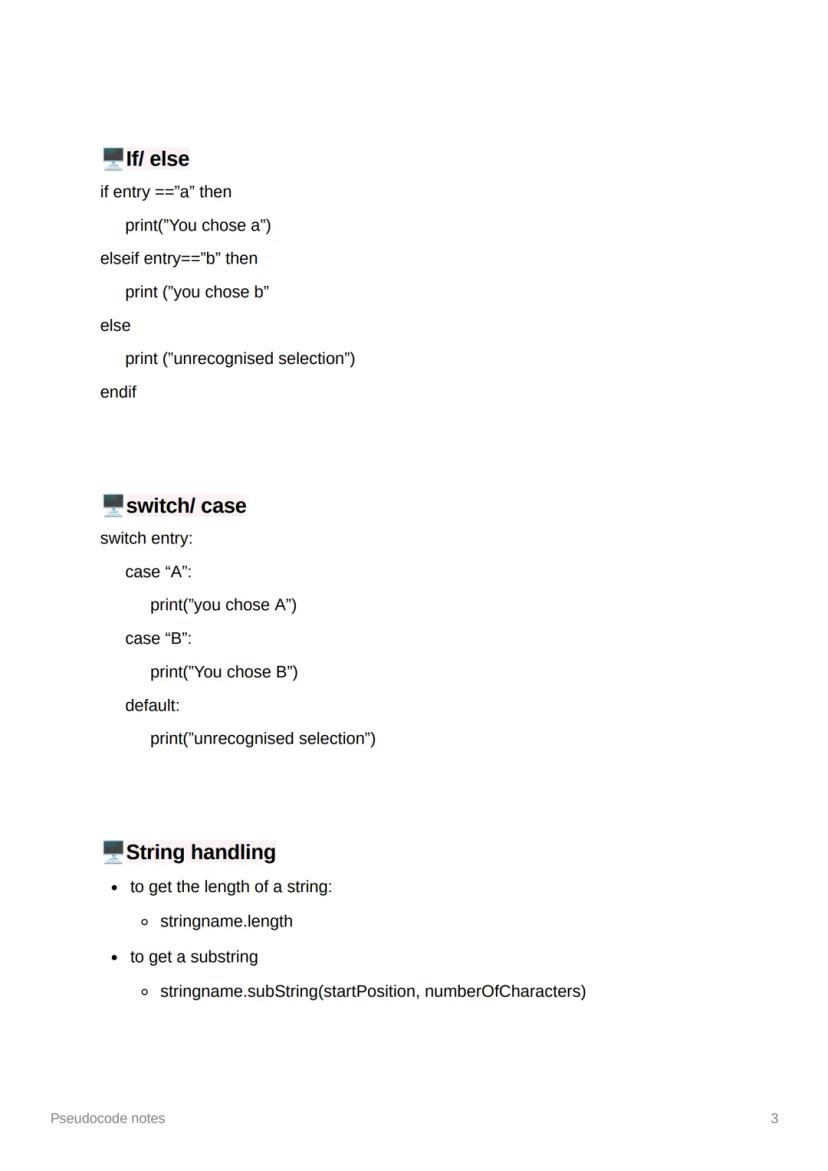
If-else statements are like having a conversation with your program - you're giving it different responses based on what the user does. The structure flows from if to elseif (for additional conditions) to else .
Switch-case statements do the same job but look much cleaner when you've got loads of options to check. They're brilliant for menu systems where users might choose A, B, C, or something completely random.
String handling gives you superpowers with text. Use .length to find out how long a string is, and .substring() to grab specific chunks of text. The substring method needs two numbers: where to start and how many characters to take.
Pro Tip: Switch statements are your friend for multiple choices - they're much easier to read than endless if-elseif chains!
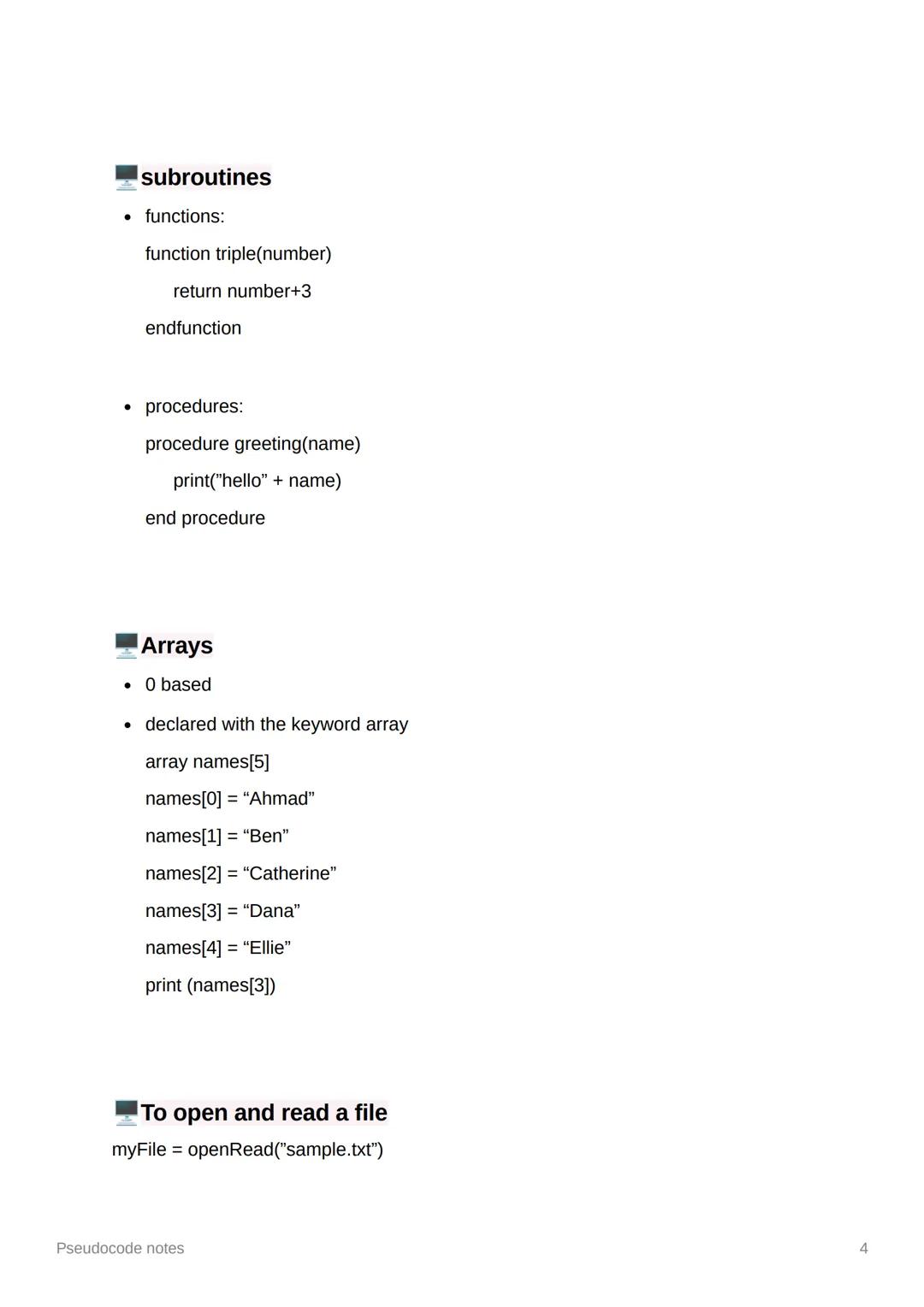
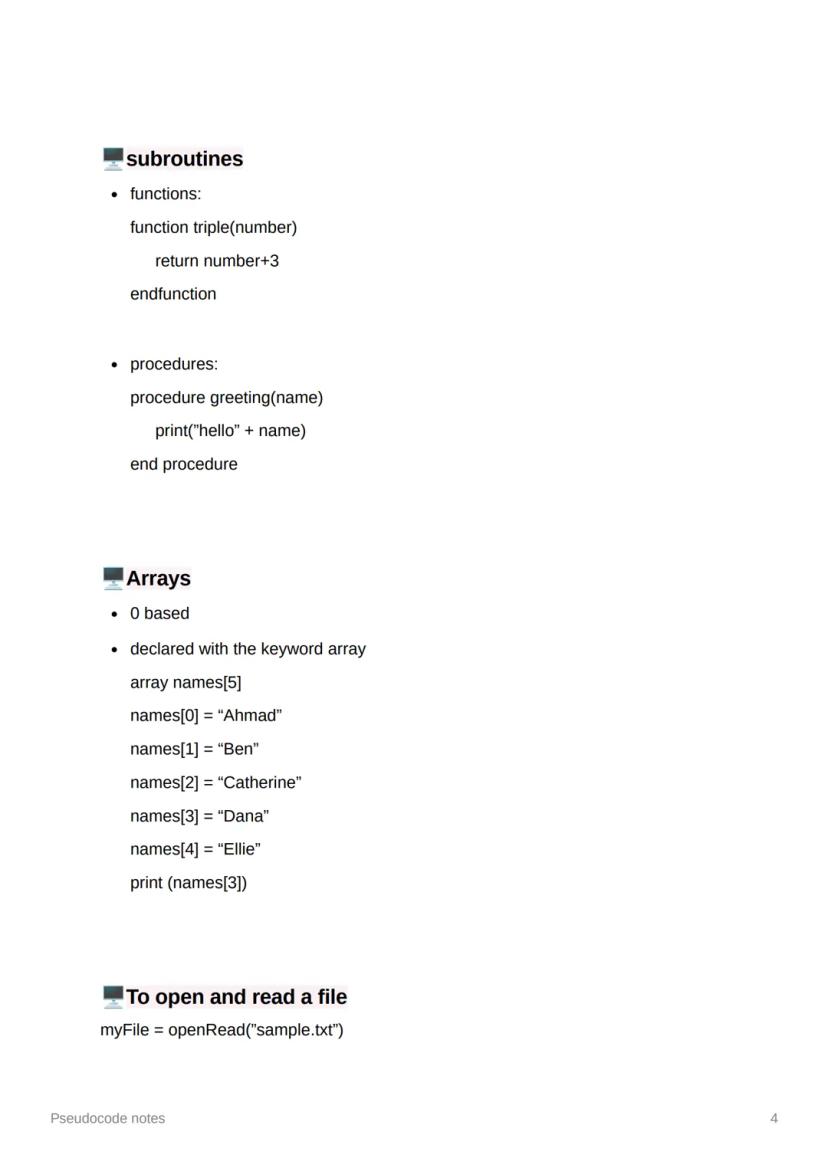
Functions and procedures are like having helpful assistants in your code. Functions do a job and give you something back (using return), whilst procedures just do a job without returning anything. Think of functions as questions that need answers, procedures as commands that just get done.
Arrays are incredibly useful for storing lists of related data. They start counting from 0 (not 1!), so your first item is always at position 0. Declare them with the array keyword and a size, then fill them up with your data.
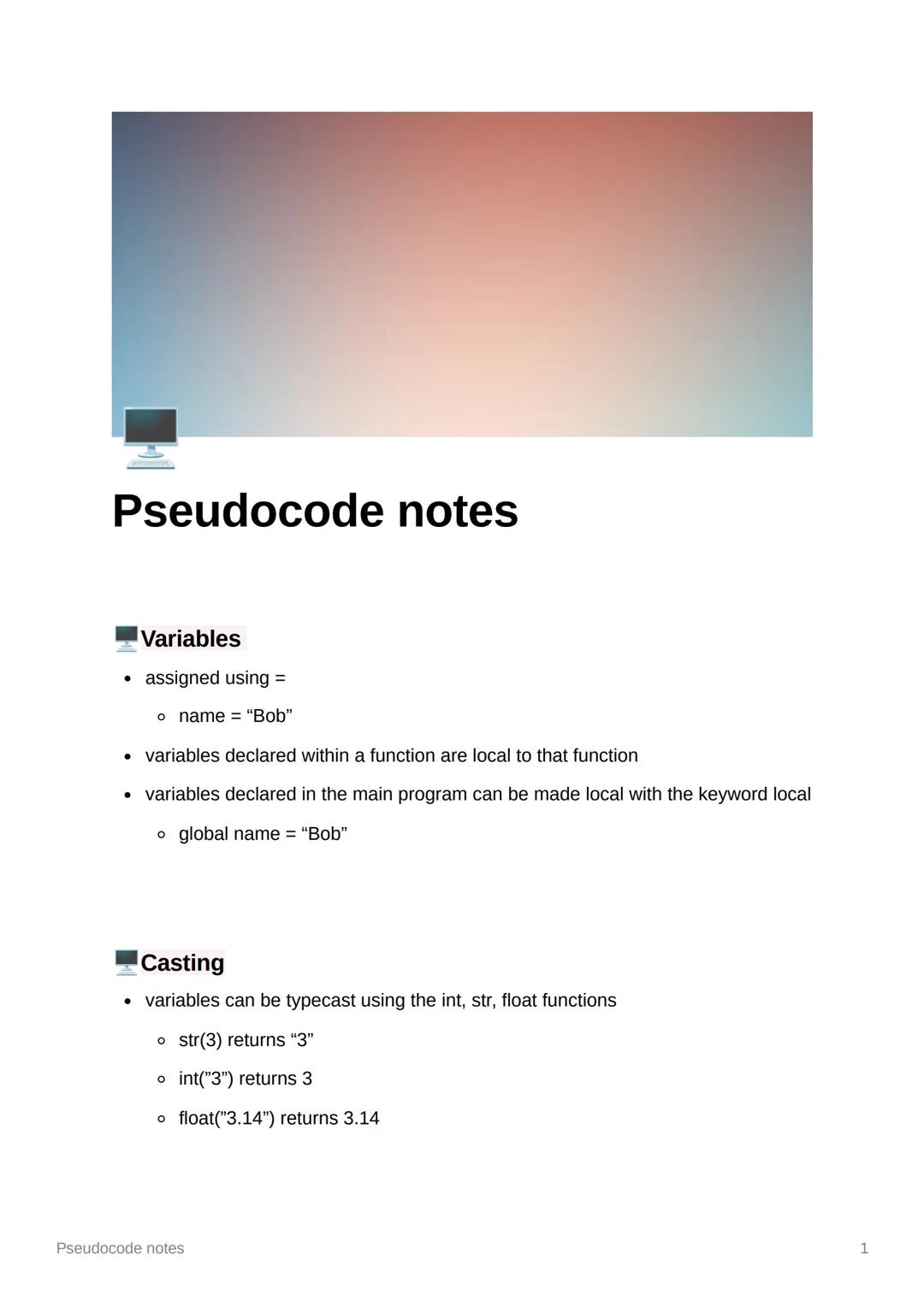
File handling lets your programs remember things between runs. Use openRead() to get information from files and readLine() to grab it line by line. Don't forget to close() your files when you're finished - it's like putting the lid back on a jar.
Key Point: Always remember arrays start at 0 - this trips up even experienced programmers sometimes!
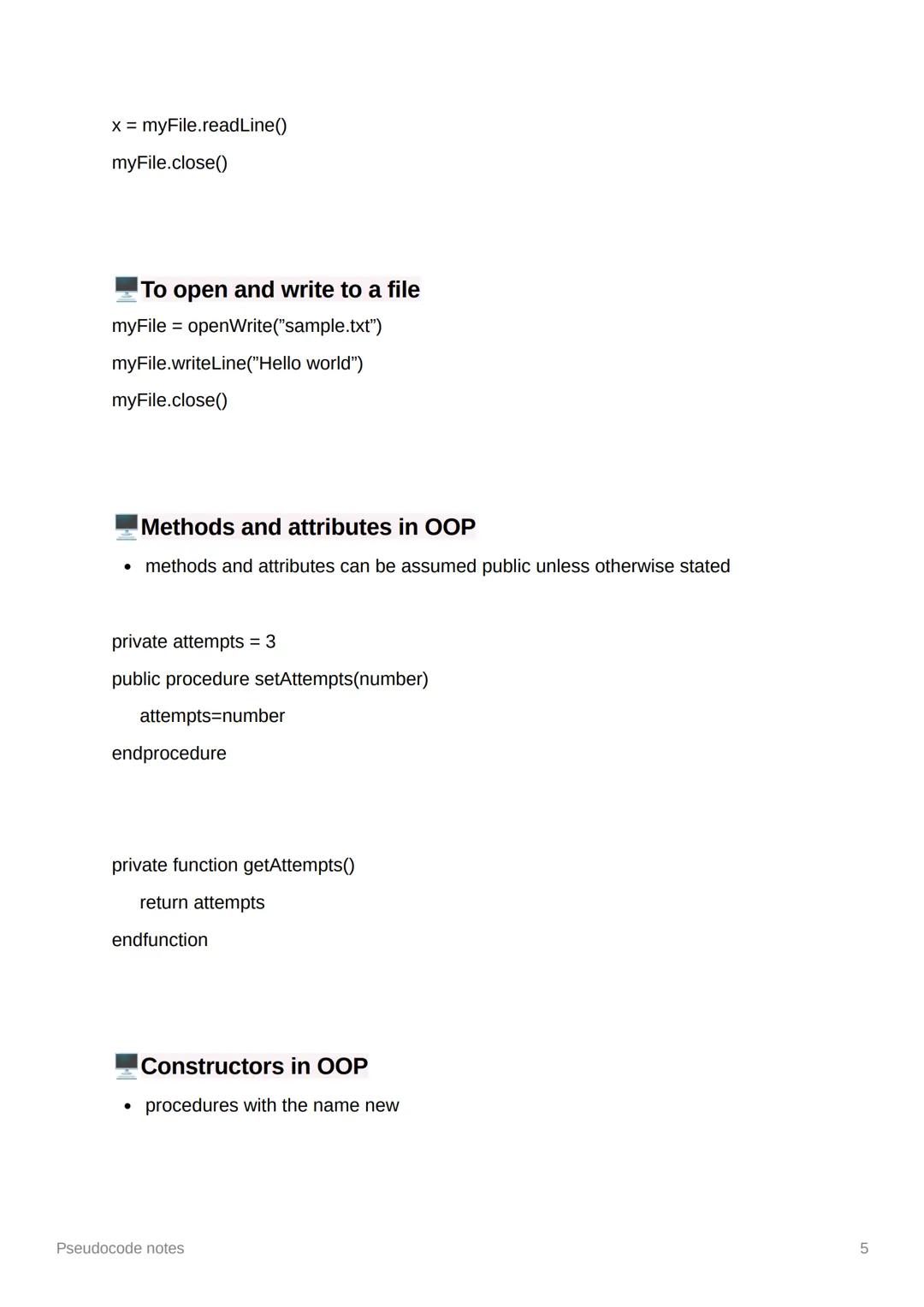
Writing to files works similarly to reading, but you use openWrite() and writeLine() instead. This is brilliant for saving user data, high scores, or any information your program needs to remember for next time.
Object-oriented programming introduces methods (what objects can do) and attributes (what objects know about themselves). Everything is public (accessible everywhere) unless you specifically make it private with the private keyword.
Constructors are special procedures called new that set up your objects when they're first created. They're like the instruction manual that gets your object ready to use - setting initial values and getting everything organised.
Remember: Think of private attributes like your diary - only you (the object) should be able to read and change them directly!
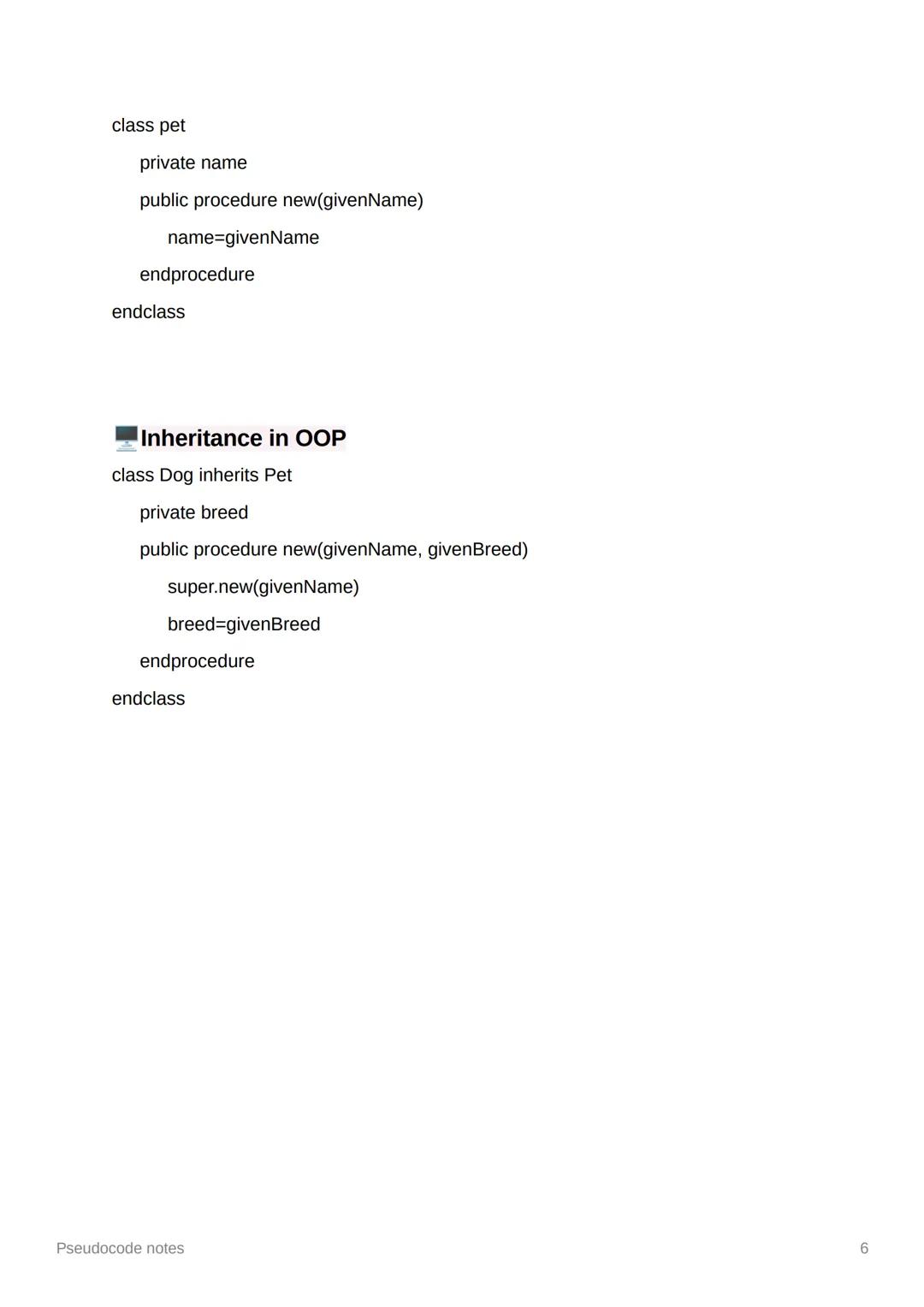
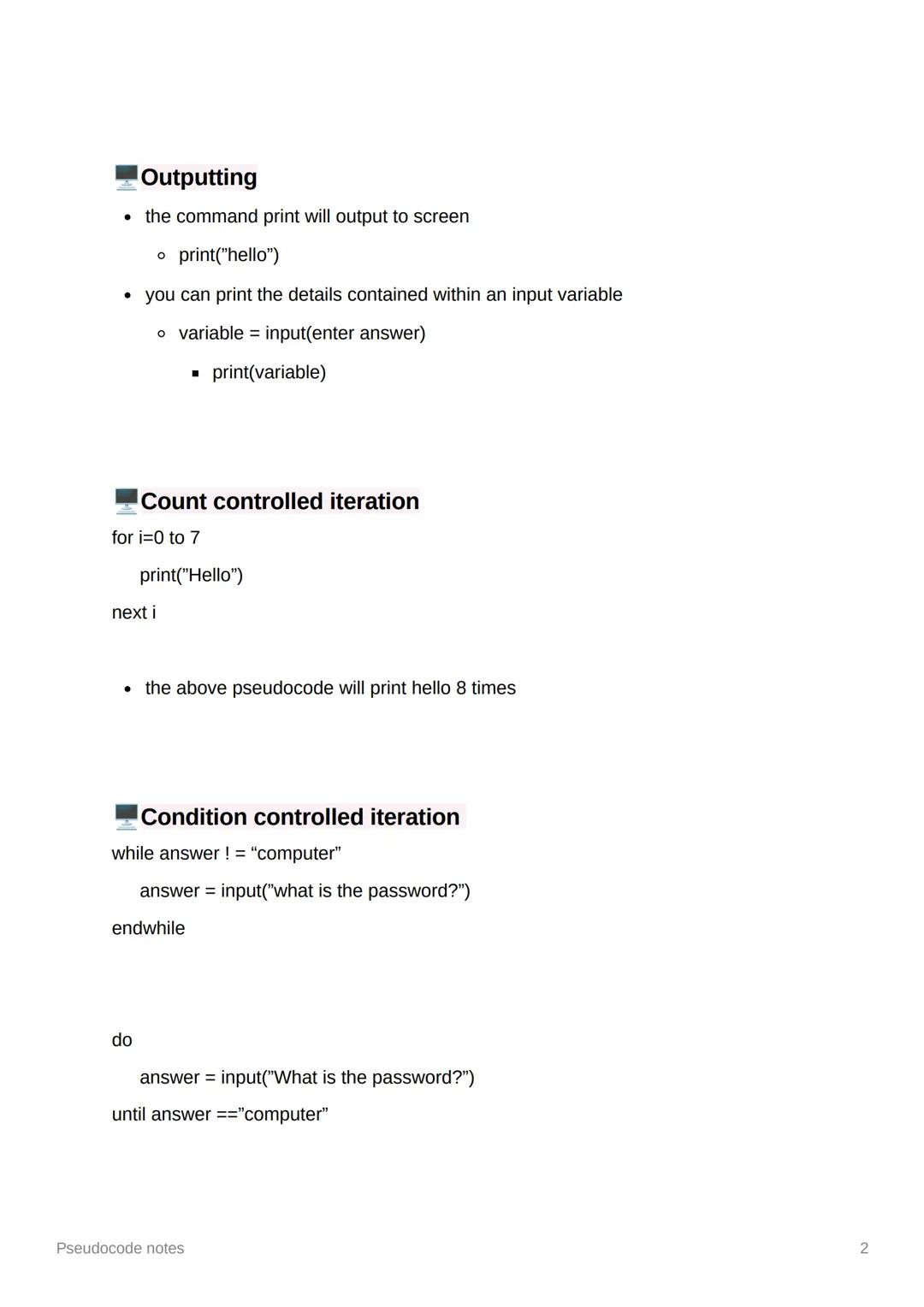
Classes are like blueprints for creating objects. The Pet class example shows how you define what all pets should have (a name) and what they can do (be created with a given name through the constructor).
Inheritance is absolutely brilliant - it lets you create new classes based on existing ones without starting from scratch. The Dog class inherits everything from Pet, then adds its own special features (like breed).
The super.new() call is clever - it runs the parent class's constructor first, then adds the new stuff. This means Dog objects get both a name (from Pet) and a breed (from Dog) without duplicating code.
Think of it this way: If Pet is like a general animal template, Dog is a more specific version that keeps all the pet features but adds dog-specific ones!
Our AI companion is specifically built for the needs of students. Based on the millions of content pieces we have on the platform we can provide truly meaningful and relevant answers to students. But its not only about answers, the companion is even more about guiding students through their daily learning challenges, with personalised study plans, quizzes or content pieces in the chat and 100% personalisation based on the students skills and developments.
You can download the app in the Google Play Store and in the Apple App Store.
That's right! Enjoy free access to study content, connect with fellow students, and get instant help – all at your fingertips.
App Store
Google Play
The app is very easy to use and well designed. I have found everything I was looking for so far and have been able to learn a lot from the presentations! I will definitely use the app for a class assignment! And of course it also helps a lot as an inspiration.
Stefan S
iOS user
This app is really great. There are so many study notes and help [...]. My problem subject is French, for example, and the app has so many options for help. Thanks to this app, I have improved my French. I would recommend it to anyone.
Samantha Klich
Android user
Wow, I am really amazed. I just tried the app because I've seen it advertised many times and was absolutely stunned. This app is THE HELP you want for school and above all, it offers so many things, such as workouts and fact sheets, which have been VERY helpful to me personally.
Anna
iOS user
I think it’s very much worth it and you’ll end up using it a lot once you get the hang of it and even after looking at others notes you can still ask your Artificial intelligence buddy the question and ask to simplify it if you still don’t get it!!! In the end I think it’s worth it 😊👍 ⚠️Also DID I MENTION ITS FREEE YOU DON’T HAVE TO PAY FOR ANYTHING AND STILL GET YOUR GRADES IN PERFECTLY❗️❗️⚠️
Thomas R
iOS user
Knowunity is the BEST app I’ve used in a minute. This is not an ai review or anything this is genuinely coming from a 7th grade student (I know 2011 im young) but dude this app is a 10/10 i have maintained a 3.8 gpa and have plenty of time for gaming. I love it and my mom is just happy I got good grades
Brad T
Android user
Not only did it help me find the answer but it also showed me alternative ways to solve it. I was horrible in math and science but now I have an a in both subjects. Thanks for the help🤍🤍
David K
iOS user
The app's just great! All I have to do is enter the topic in the search bar and I get the response real fast. I don't have to watch 10 YouTube videos to understand something, so I'm saving my time. Highly recommended!
Sudenaz Ocak
Android user
In school I was really bad at maths but thanks to the app, I am doing better now. I am so grateful that you made the app.
Greenlight Bonnie
Android user
I found this app a couple years ago and it has only gotten better since then. I really love it because it can help with written questions and photo questions. Also, it can find study guides that other people have made as well as flashcard sets and practice tests. The free version is also amazing for students who might not be able to afford it. Would 100% recommend
Aubrey
iOS user
Best app if you're in Highschool or Junior high. I have been using this app for 2 school years and it's the best, it's good if you don't have anyone to help you with school work.😋🩷🎀
Marco B
iOS user
THE QUIZES AND FLASHCARDS ARE SO USEFUL AND I LOVE THE SCHOOLGPT. IT ALSO IS LITREALLY LIKE CHATGPT BUT SMARTER!! HELPED ME WITH MY MASCARA PROBLEMS TOO!! AS WELL AS MY REAL SUBJECTS ! DUHHH 😍😁😲🤑💗✨🎀😮
Elisha
iOS user
This app is phenomenal down to the correct info and the various topics you can study! I greatly recommend it for people who struggle with procrastination and those who need homework help. It has been perfectly accurate for world 1 history as far as I’ve seen! Geometry too!
Paul T
iOS user
The app is very easy to use and well designed. I have found everything I was looking for so far and have been able to learn a lot from the presentations! I will definitely use the app for a class assignment! And of course it also helps a lot as an inspiration.
Stefan S
iOS user
This app is really great. There are so many study notes and help [...]. My problem subject is French, for example, and the app has so many options for help. Thanks to this app, I have improved my French. I would recommend it to anyone.
Samantha Klich
Android user
Wow, I am really amazed. I just tried the app because I've seen it advertised many times and was absolutely stunned. This app is THE HELP you want for school and above all, it offers so many things, such as workouts and fact sheets, which have been VERY helpful to me personally.
Anna
iOS user
I think it’s very much worth it and you’ll end up using it a lot once you get the hang of it and even after looking at others notes you can still ask your Artificial intelligence buddy the question and ask to simplify it if you still don’t get it!!! In the end I think it’s worth it 😊👍 ⚠️Also DID I MENTION ITS FREEE YOU DON’T HAVE TO PAY FOR ANYTHING AND STILL GET YOUR GRADES IN PERFECTLY❗️❗️⚠️
Thomas R
iOS user
Knowunity is the BEST app I’ve used in a minute. This is not an ai review or anything this is genuinely coming from a 7th grade student (I know 2011 im young) but dude this app is a 10/10 i have maintained a 3.8 gpa and have plenty of time for gaming. I love it and my mom is just happy I got good grades
Brad T
Android user
Not only did it help me find the answer but it also showed me alternative ways to solve it. I was horrible in math and science but now I have an a in both subjects. Thanks for the help🤍🤍
David K
iOS user
The app's just great! All I have to do is enter the topic in the search bar and I get the response real fast. I don't have to watch 10 YouTube videos to understand something, so I'm saving my time. Highly recommended!
Sudenaz Ocak
Android user
In school I was really bad at maths but thanks to the app, I am doing better now. I am so grateful that you made the app.
Greenlight Bonnie
Android user
I found this app a couple years ago and it has only gotten better since then. I really love it because it can help with written questions and photo questions. Also, it can find study guides that other people have made as well as flashcard sets and practice tests. The free version is also amazing for students who might not be able to afford it. Would 100% recommend
Aubrey
iOS user
Best app if you're in Highschool or Junior high. I have been using this app for 2 school years and it's the best, it's good if you don't have anyone to help you with school work.😋🩷🎀
Marco B
iOS user
THE QUIZES AND FLASHCARDS ARE SO USEFUL AND I LOVE THE SCHOOLGPT. IT ALSO IS LITREALLY LIKE CHATGPT BUT SMARTER!! HELPED ME WITH MY MASCARA PROBLEMS TOO!! AS WELL AS MY REAL SUBJECTS ! DUHHH 😍😁😲🤑💗✨🎀😮
Elisha
iOS user
This app is phenomenal down to the correct info and the various topics you can study! I greatly recommend it for people who struggle with procrastination and those who need homework help. It has been perfectly accurate for world 1 history as far as I’ve seen! Geometry too!
Paul T
iOS user
Pseudocode is your stepping stone to proper programming - it's like writing instructions in plain English before converting them into actual code. These notes cover all the essential building blocks you'll need for your programming coursework, from basic variables to... Show more
Access to all documents
Improve your grades
Join milions of students
By signing up you accept Terms of Service and Privacy Policy
Getting comfortable with variables is absolutely crucial - they're basically containers that store information your program needs to remember. You create them using the equals sign, like name = "Bob", and it's that simple.
Here's something important to remember: variables created inside a function stay local to that function (they can't be used elsewhere). However, if you want to make a variable from your main program local to a specific function, just use the local keyword, or make it available everywhere with global.
Casting lets you convert between different data types, which you'll use constantly. The functions str(), int(), and float() are your best mates here - str(3) gives you "3", whilst int("3") gives you the number 3.
Quick Tip: Think of casting like translation - you're converting data from one "language" (type) to another so different parts of your program can understand it.
Access to all documents
Improve your grades
Join milions of students
By signing up you accept Terms of Service and Privacy Policy
The print command is your window to the world - it displays whatever you want on screen. You can print text directly with print("hello") or show what's stored in a variable by printing the variable itself.
Count controlled iteration (for loops) runs a specific number of times. The example for i=0 to 7 actually runs 8 times because it includes both 0 and 7 - this catches loads of students out in exams!
Condition controlled iteration keeps going until something changes. While loops check the condition first, then run the code. Do-until loops run the code first, then check - this guarantees the code runs at least once, which is sometimes exactly what you need.
Remember: Count when you know how many times, condition when you're waiting for something to happen!
Access to all documents
Improve your grades
Join milions of students
By signing up you accept Terms of Service and Privacy Policy
If-else statements are like having a conversation with your program - you're giving it different responses based on what the user does. The structure flows from if to elseif (for additional conditions) to else .
Switch-case statements do the same job but look much cleaner when you've got loads of options to check. They're brilliant for menu systems where users might choose A, B, C, or something completely random.
String handling gives you superpowers with text. Use .length to find out how long a string is, and .substring() to grab specific chunks of text. The substring method needs two numbers: where to start and how many characters to take.
Pro Tip: Switch statements are your friend for multiple choices - they're much easier to read than endless if-elseif chains!
Access to all documents
Improve your grades
Join milions of students
By signing up you accept Terms of Service and Privacy Policy
Functions and procedures are like having helpful assistants in your code. Functions do a job and give you something back (using return), whilst procedures just do a job without returning anything. Think of functions as questions that need answers, procedures as commands that just get done.
Arrays are incredibly useful for storing lists of related data. They start counting from 0 (not 1!), so your first item is always at position 0. Declare them with the array keyword and a size, then fill them up with your data.
File handling lets your programs remember things between runs. Use openRead() to get information from files and readLine() to grab it line by line. Don't forget to close() your files when you're finished - it's like putting the lid back on a jar.
Key Point: Always remember arrays start at 0 - this trips up even experienced programmers sometimes!
Access to all documents
Improve your grades
Join milions of students
By signing up you accept Terms of Service and Privacy Policy
Writing to files works similarly to reading, but you use openWrite() and writeLine() instead. This is brilliant for saving user data, high scores, or any information your program needs to remember for next time.
Object-oriented programming introduces methods (what objects can do) and attributes (what objects know about themselves). Everything is public (accessible everywhere) unless you specifically make it private with the private keyword.
Constructors are special procedures called new that set up your objects when they're first created. They're like the instruction manual that gets your object ready to use - setting initial values and getting everything organised.
Remember: Think of private attributes like your diary - only you (the object) should be able to read and change them directly!
Access to all documents
Improve your grades
Join milions of students
By signing up you accept Terms of Service and Privacy Policy
Classes are like blueprints for creating objects. The Pet class example shows how you define what all pets should have (a name) and what they can do (be created with a given name through the constructor).
Inheritance is absolutely brilliant - it lets you create new classes based on existing ones without starting from scratch. The Dog class inherits everything from Pet, then adds its own special features (like breed).
The super.new() call is clever - it runs the parent class's constructor first, then adds the new stuff. This means Dog objects get both a name (from Pet) and a breed (from Dog) without duplicating code.
Think of it this way: If Pet is like a general animal template, Dog is a more specific version that keeps all the pet features but adds dog-specific ones!
Our AI companion is specifically built for the needs of students. Based on the millions of content pieces we have on the platform we can provide truly meaningful and relevant answers to students. But its not only about answers, the companion is even more about guiding students through their daily learning challenges, with personalised study plans, quizzes or content pieces in the chat and 100% personalisation based on the students skills and developments.
You can download the app in the Google Play Store and in the Apple App Store.
That's right! Enjoy free access to study content, connect with fellow students, and get instant help – all at your fingertips.
16
Smart Tools NEW
Transform this note into: ✓ 50+ Practice Questions ✓ Interactive Flashcards ✓ Full Mock Exam ✓ Essay Outlines
Explore essential programming constructs including loops, conditionals, and object-oriented principles. This summary covers key concepts such as recursion, encapsulation, inheritance, and the differences between local and global variables. Ideal for OCR A Level Computer Science students preparing for Component 2.2.
 Computer Science
Explore essential programming techniques including recursion, iteration, and modular programming. This summary covers key concepts such as algorithms, debugging, and data abstraction, providing a clear understanding of problem-solving methods in computer science. Ideal for OCR A-Level Computer Science students.
Computer ScienceExplore essential Python programming constructs including variables, control structures, operators, and data types. This summary covers key definitions such as strings, arrays, and the differences between local and global variables, providing a solid foundation for understanding Python basics.
Computer ScienceMaster key SQL commands with this concise cheat sheet covering SELECT, INSERT, UPDATE, DELETE, and JOIN statements. Perfect for GCSE and National 5 revision, this resource provides clear examples and syntax to enhance your database query skills.
Computer ScienceExplore the fundamental concepts of Object-Oriented Programming (OOP) with this comprehensive guide. Covering key topics such as classes, objects, inheritance, encapsulation, polymorphism, and class diagrams, this resource is designed for AQA A-Level Computer Science students. Understand the principles of OOP and how to effectively apply them in programming.
Computer ScienceApp Store
Google Play
The app is very easy to use and well designed. I have found everything I was looking for so far and have been able to learn a lot from the presentations! I will definitely use the app for a class assignment! And of course it also helps a lot as an inspiration.
Stefan S
iOS user
This app is really great. There are so many study notes and help [...]. My problem subject is French, for example, and the app has so many options for help. Thanks to this app, I have improved my French. I would recommend it to anyone.
Samantha Klich
Android user
Wow, I am really amazed. I just tried the app because I've seen it advertised many times and was absolutely stunned. This app is THE HELP you want for school and above all, it offers so many things, such as workouts and fact sheets, which have been VERY helpful to me personally.
Anna
iOS user
I think it’s very much worth it and you’ll end up using it a lot once you get the hang of it and even after looking at others notes you can still ask your Artificial intelligence buddy the question and ask to simplify it if you still don’t get it!!! In the end I think it’s worth it 😊👍 ⚠️Also DID I MENTION ITS FREEE YOU DON’T HAVE TO PAY FOR ANYTHING AND STILL GET YOUR GRADES IN PERFECTLY❗️❗️⚠️
Thomas R
iOS user
Knowunity is the BEST app I’ve used in a minute. This is not an ai review or anything this is genuinely coming from a 7th grade student (I know 2011 im young) but dude this app is a 10/10 i have maintained a 3.8 gpa and have plenty of time for gaming. I love it and my mom is just happy I got good grades
Brad T
Android user
Not only did it help me find the answer but it also showed me alternative ways to solve it. I was horrible in math and science but now I have an a in both subjects. Thanks for the help🤍🤍
David K
iOS user
The app's just great! All I have to do is enter the topic in the search bar and I get the response real fast. I don't have to watch 10 YouTube videos to understand something, so I'm saving my time. Highly recommended!
Sudenaz Ocak
Android user
In school I was really bad at maths but thanks to the app, I am doing better now. I am so grateful that you made the app.
Greenlight Bonnie
Android user
I found this app a couple years ago and it has only gotten better since then. I really love it because it can help with written questions and photo questions. Also, it can find study guides that other people have made as well as flashcard sets and practice tests. The free version is also amazing for students who might not be able to afford it. Would 100% recommend
Aubrey
iOS user
Best app if you're in Highschool or Junior high. I have been using this app for 2 school years and it's the best, it's good if you don't have anyone to help you with school work.😋🩷🎀
Marco B
iOS user
THE QUIZES AND FLASHCARDS ARE SO USEFUL AND I LOVE THE SCHOOLGPT. IT ALSO IS LITREALLY LIKE CHATGPT BUT SMARTER!! HELPED ME WITH MY MASCARA PROBLEMS TOO!! AS WELL AS MY REAL SUBJECTS ! DUHHH 😍😁😲🤑💗✨🎀😮
Elisha
iOS user
This app is phenomenal down to the correct info and the various topics you can study! I greatly recommend it for people who struggle with procrastination and those who need homework help. It has been perfectly accurate for world 1 history as far as I’ve seen! Geometry too!
Paul T
iOS user
The app is very easy to use and well designed. I have found everything I was looking for so far and have been able to learn a lot from the presentations! I will definitely use the app for a class assignment! And of course it also helps a lot as an inspiration.
Stefan S
iOS user
This app is really great. There are so many study notes and help [...]. My problem subject is French, for example, and the app has so many options for help. Thanks to this app, I have improved my French. I would recommend it to anyone.
Samantha Klich
Android user
Wow, I am really amazed. I just tried the app because I've seen it advertised many times and was absolutely stunned. This app is THE HELP you want for school and above all, it offers so many things, such as workouts and fact sheets, which have been VERY helpful to me personally.
Anna
iOS user
I think it’s very much worth it and you’ll end up using it a lot once you get the hang of it and even after looking at others notes you can still ask your Artificial intelligence buddy the question and ask to simplify it if you still don’t get it!!! In the end I think it’s worth it 😊👍 ⚠️Also DID I MENTION ITS FREEE YOU DON’T HAVE TO PAY FOR ANYTHING AND STILL GET YOUR GRADES IN PERFECTLY❗️❗️⚠️
Thomas R
iOS user
Knowunity is the BEST app I’ve used in a minute. This is not an ai review or anything this is genuinely coming from a 7th grade student (I know 2011 im young) but dude this app is a 10/10 i have maintained a 3.8 gpa and have plenty of time for gaming. I love it and my mom is just happy I got good grades
Brad T
Android user
Not only did it help me find the answer but it also showed me alternative ways to solve it. I was horrible in math and science but now I have an a in both subjects. Thanks for the help🤍🤍
David K
iOS user
The app's just great! All I have to do is enter the topic in the search bar and I get the response real fast. I don't have to watch 10 YouTube videos to understand something, so I'm saving my time. Highly recommended!
Sudenaz Ocak
Android user
In school I was really bad at maths but thanks to the app, I am doing better now. I am so grateful that you made the app.
Greenlight Bonnie
Android user
I found this app a couple years ago and it has only gotten better since then. I really love it because it can help with written questions and photo questions. Also, it can find study guides that other people have made as well as flashcard sets and practice tests. The free version is also amazing for students who might not be able to afford it. Would 100% recommend
Aubrey
iOS user
Best app if you're in Highschool or Junior high. I have been using this app for 2 school years and it's the best, it's good if you don't have anyone to help you with school work.😋🩷🎀
Marco B
iOS user
THE QUIZES AND FLASHCARDS ARE SO USEFUL AND I LOVE THE SCHOOLGPT. IT ALSO IS LITREALLY LIKE CHATGPT BUT SMARTER!! HELPED ME WITH MY MASCARA PROBLEMS TOO!! AS WELL AS MY REAL SUBJECTS ! DUHHH 😍😁😲🤑💗✨🎀😮
Elisha
iOS user
This app is phenomenal down to the correct info and the various topics you can study! I greatly recommend it for people who struggle with procrastination and those who need homework help. It has been perfectly accurate for world 1 history as far as I’ve seen! Geometry too!
Paul T
iOS user