Open the App

Subjects

ICT Basics Reviewer

1

0

M

Mikaela Caballes

12/12/2025

Iba pa

ICT Reviewer

189

Dec 12, 2025

14 pages

ICT Basics Reviewer

M

Mikaela Caballes

@mikaelacaballes

Pag usapang computer applications, medyo nakakahilo ang daming dapat alamin,... Show more

Page 1
Page 2
Page 3
Page 4
Page 5
Page 6
Page 7
Page 8
Page 9
Page 10
1 / 10
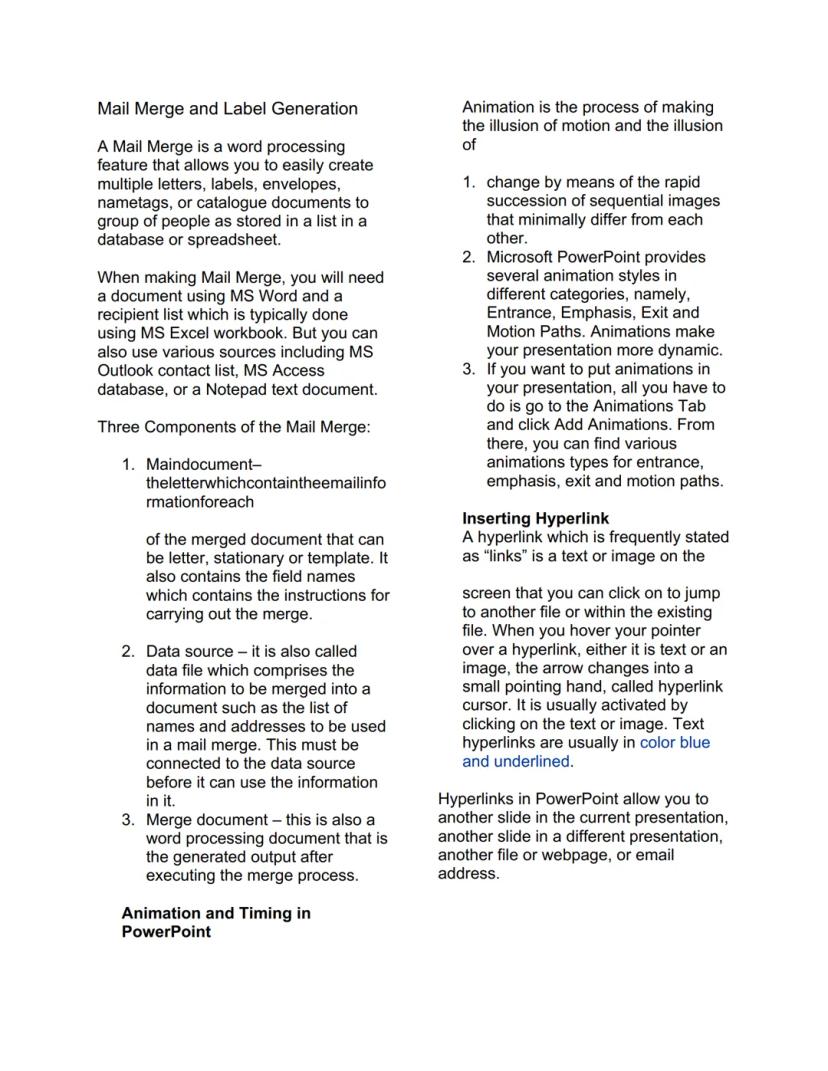
## Mail Merge and Label Generation

A Mail Merge is a word processing
feature that allows you to easily create
multiple letters, labels, env

Mail Merge, PowerPoint Animations, at Hyperlinks

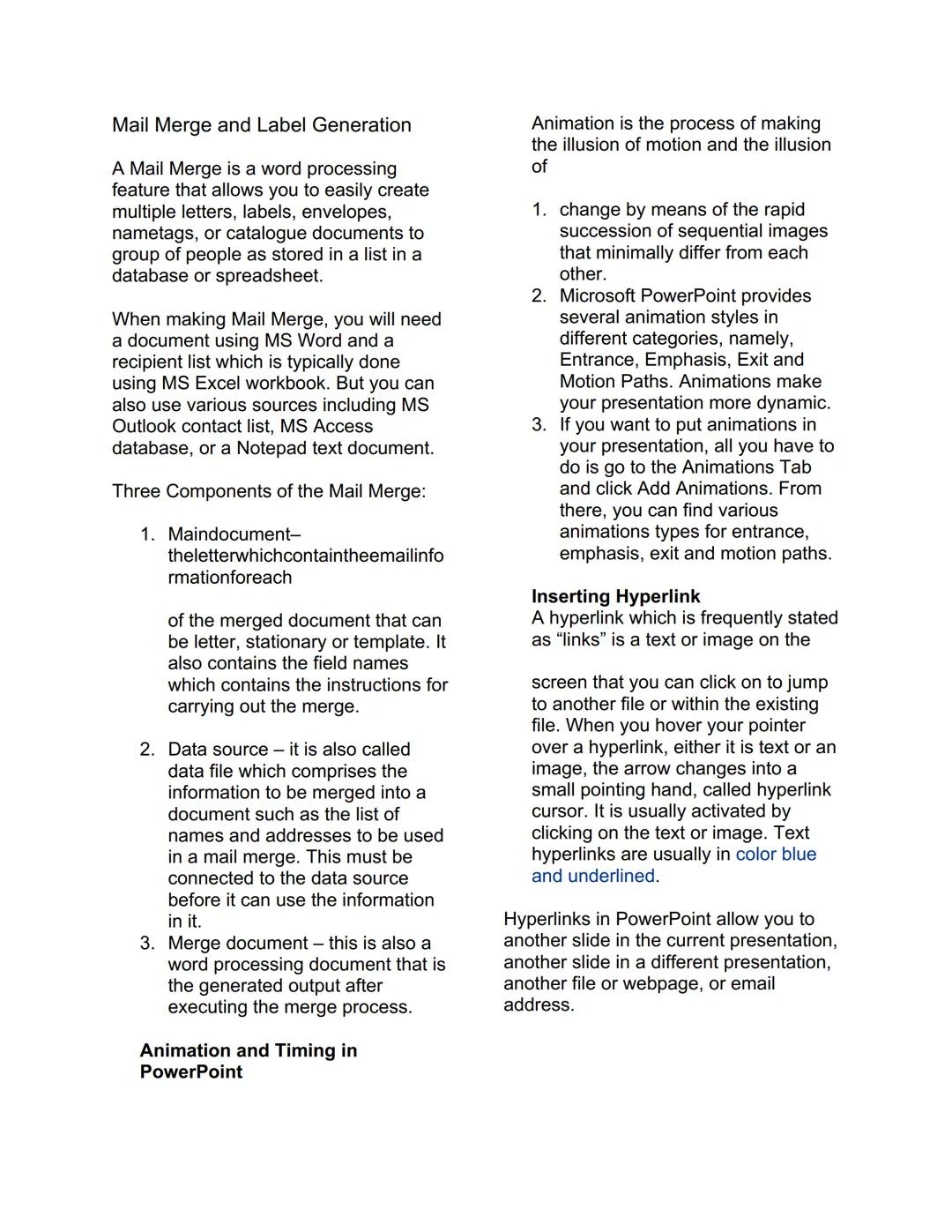
Ang Mail Merge ay parang magic trick ng MS Word - ginagawa niyang madali ang paglikha ng maraming personalized na documents. Kailangan mo lang ng main document (yung letter template) at data source (yung list ng names at addresses sa Excel). Ang merge document naman yung final output mo after ng process.

Sa PowerPoint, ang animations ay nagbibigay-buhay sa presentations mo. May apat na categories: Entrance, Emphasis, Exit, at Motion Paths. Para mag-add ng animation, pumunta lang sa Animations Tab at click ang Add Animations.

Ang hyperlinks naman ay mga clickable na text o images na magdadala sa'yo sa ibang slide, file, o webpage. Makikilala mo sila sa blue at underlined na text, at pag nag-hover ka ng mouse, magiging pointing hand yung cursor.

Pro Tip: Gamitin ang Mail Merge para sa mga class invitations o certificates - mas efficient kaysa sa isa-isang pag-type!

## Mail Merge and Label Generation

A Mail Merge is a word processing
feature that allows you to easily create
multiple letters, labels, env

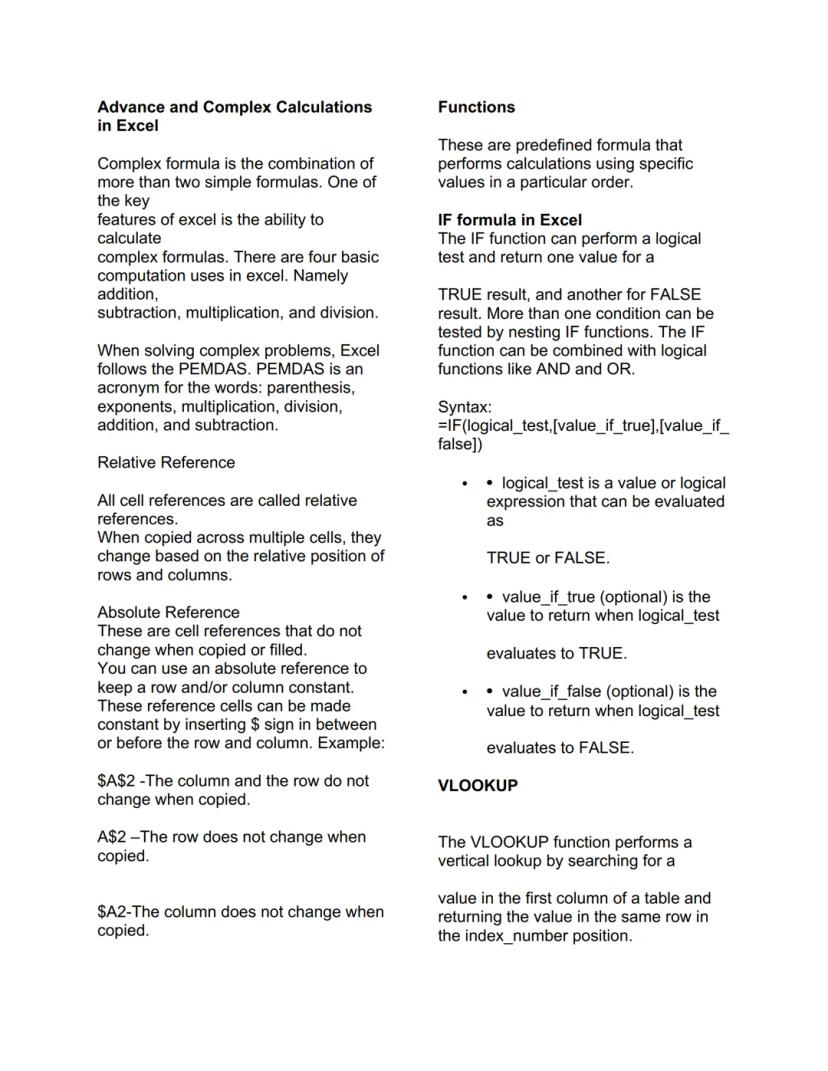
Excel Formulas at Functions

Ang Excel ay hindi lang para sa simple calculations - kaya niyang mag-handle ng complex formulas gamit ang PEMDAS rule. Remember: Parenthesis, Exponents, Multiplication, Division, Addition, Subtraction - same sa Math class mo!

May tatlong types ng cell references: Relative nagbabagokapagnacopynagbabago kapag na-copy, Absolute (hindi nagbabago, may $ sign), at Mixed (may $ sa row o column lang). Ang functions naman ay pre-made formulas na magpapadali sa work mo.

Ang IF function ay nagde-decide based sa condition mo: =IFlogicaltest,valueiftrue,valueiffalselogical_test, value_if_true, value_if_false. Ang VLOOKUP naman ay nag-search ng value sa table at nagre-return ng corresponding data - super useful sa data analysis!

Lifesaver Alert: Master mo ang VLOOKUP kasi laging ginagamit 'yan sa work - parang Google search pero sa Excel!

## Mail Merge and Label Generation

A Mail Merge is a word processing
feature that allows you to easily create
multiple letters, labels, env

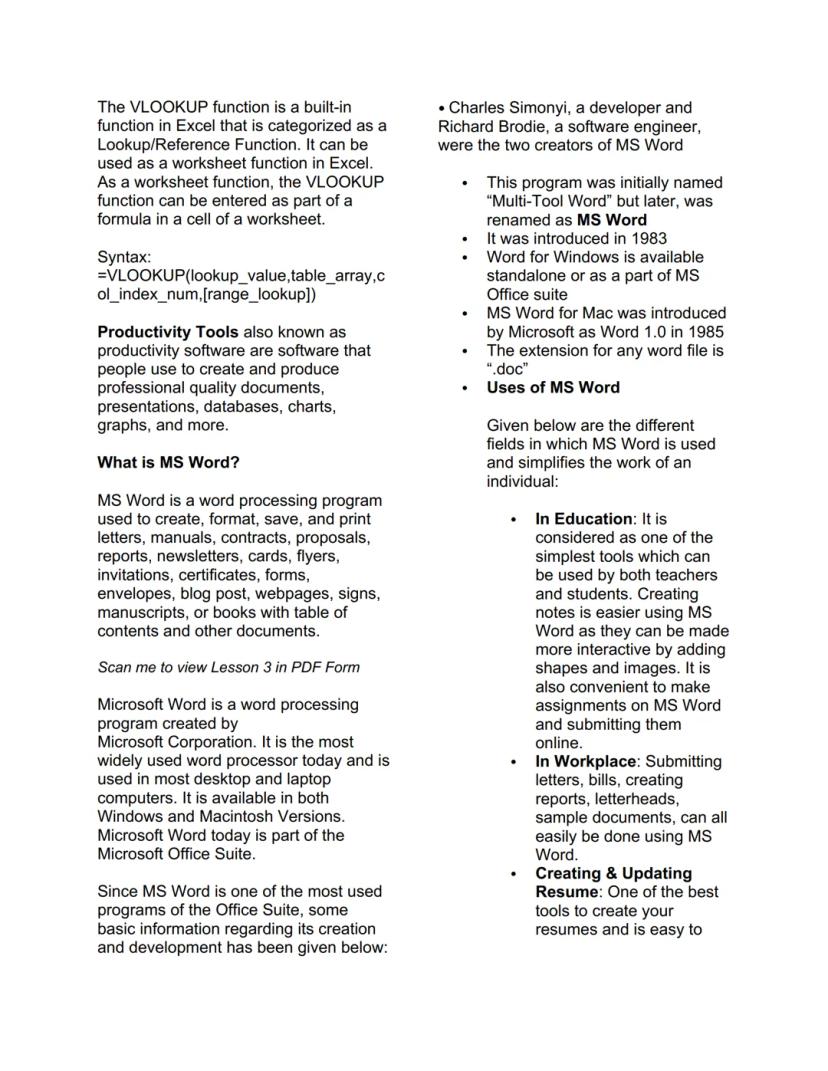
MS Word Basics at Features

Ang MS Word ay ginawa ni Charles Simonyi at Richard Brodie noong 1983, originally called "Multi-Tool Word." Ngayon, isa sa pinaka-widely used na word processors worldwide at part ng MS Office Suite.

Sobrang versatile ng Word - pwede mo gamitin sa education para sa assignments at notes, sa workplace para sa reports at letters, at sa pag-create ng professional resumes. Para sa mga aspiring authors, may built-in features para sa bibliography at table of contents.

Sa productivity, ang MS Word ay considered na essential tool. May .doc extension ang files niya, at available siya both sa Windows at Mac. Kung nag-start ka pa lang sa computer applications, ito usually ang unang natutuhan.

Career Boost: Ang MS Word skills ay basic requirement sa lahat ng jobs ngayon - invest time mo rito!

## Mail Merge and Label Generation

A Mail Merge is a word processing
feature that allows you to easily create
multiple letters, labels, env

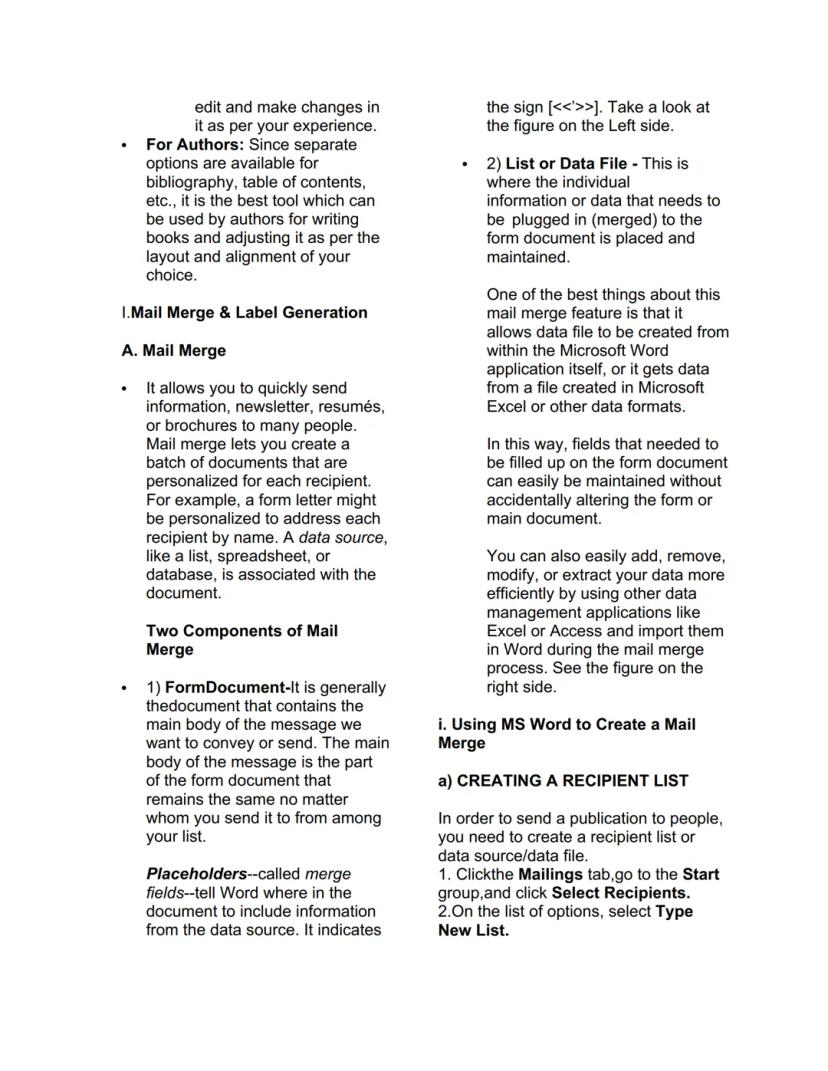
Mail Merge Process at Components

Ang Mail Merge ay may dalawang main components: Form Document (main body ng message mo) at Data File yungindividualinfonaipaplugmoyung individual info na ipa-plug mo. Ang form document ay may mga merge fields na marked ng <<<>>><<<>>> signs.

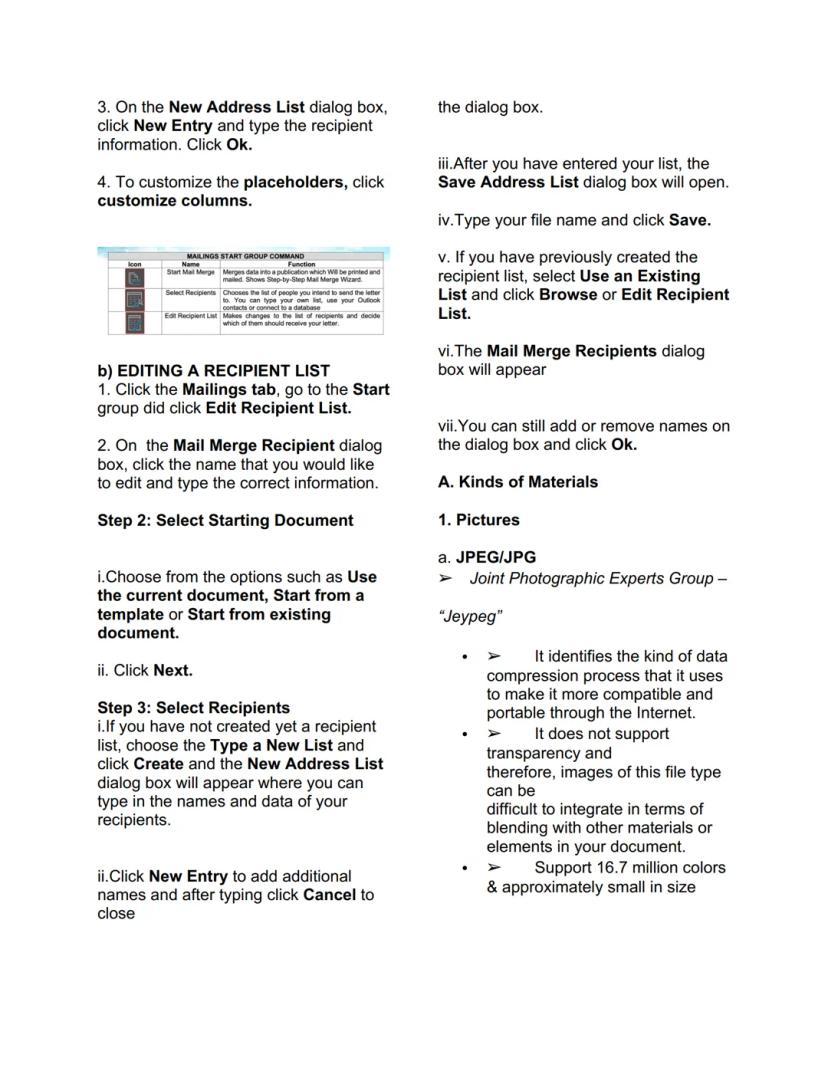
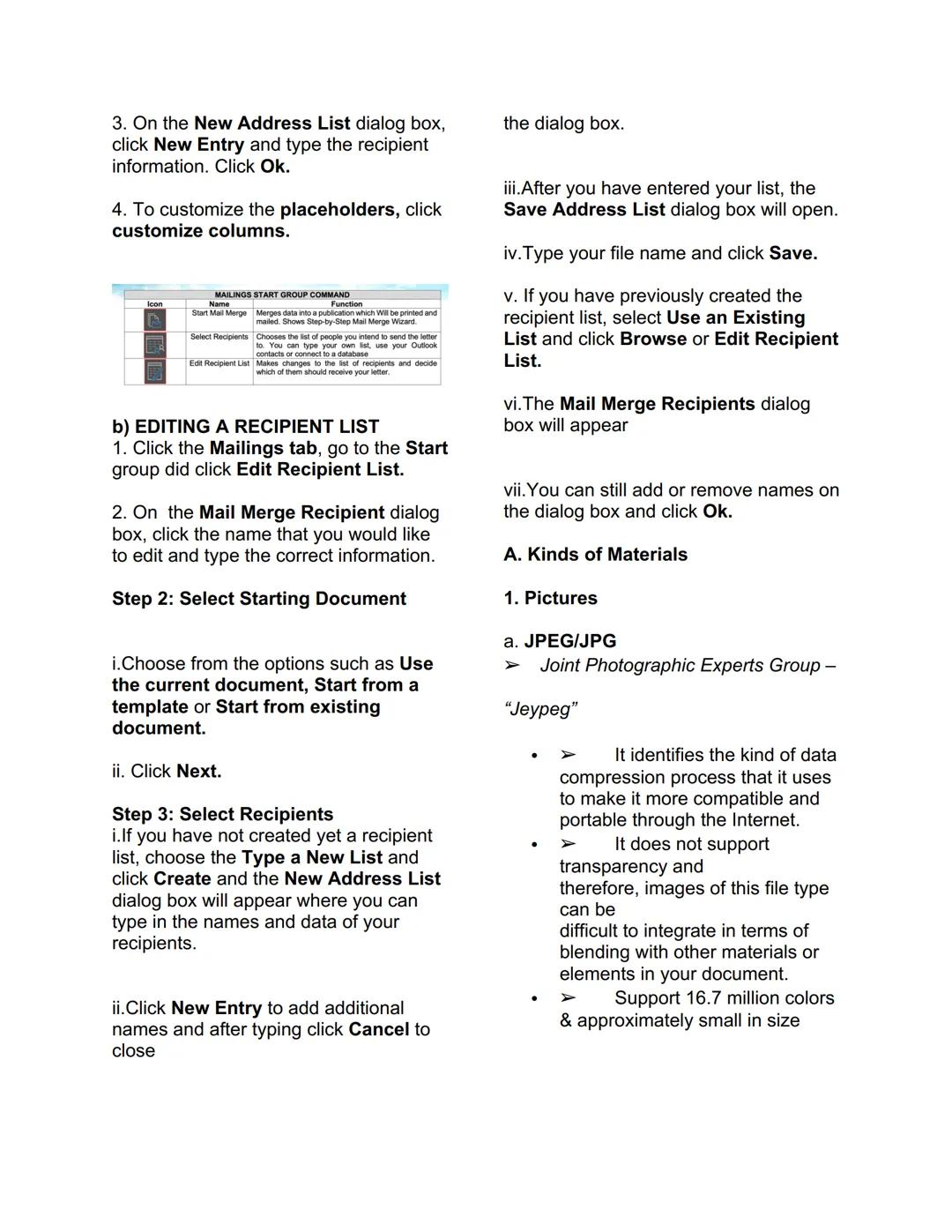
Para mag-create ng recipient list, go to Mailings tab > Start group > Select Recipients > Type New List. Sa New Address List dialog box, pwede mo i-customize ang columns at mag-add ng new entries. Para mag-edit, click lang ang Edit Recipient List.

Ang step-by-step process ay simple: select starting document, choose recipients (create new list o use existing), then merge na! Pwede kang mag-save ng address list para ma-reuse mo sa future projects.

Time Saver: Once na-setup mo ang data file, pwede mo siyang gamitin ulit para sa iba't ibang mail merge projects!

## Mail Merge and Label Generation

A Mail Merge is a word processing
feature that allows you to easily create
multiple letters, labels, env

Image Types at Materials sa Documents

Sa pag-insert ng pictures, may tatlong main types: JPEG/JPG (16.7 million colors, small size, walang transparency), GIF (may transparency at animation, 256 colors lang), at PNG (best quality, may transparency control, 16 million colors).

Ang Clip Art (sa old versions) o Icons/3D Models (sa newer versions) ay mga generic representations para sa ideas. Ang Shapes naman ay printable objects na pwede mong gamitin para sa layout design.

Ang Smart Art ay pre-designed groups ng shapes para sa organizational charts at processes. May Chart feature din para sa data presentation, at Screenshots tool para sa screen captures with snipping functionality.

Design Tip: Gamitin ang PNG para sa logos at graphics na may transparency, JPEG para sa photos na i-email mo!

## Mail Merge and Label Generation

A Mail Merge is a word processing
feature that allows you to easily create
multiple letters, labels, env

MS Excel Fundamentals

Ang MS Excel ay isang commercial spreadsheet application na ginagamit sa accounting, financial applications, statistics, at engineering calculations. Ito ay computerized worksheet na may cells arranged in rows at columns.

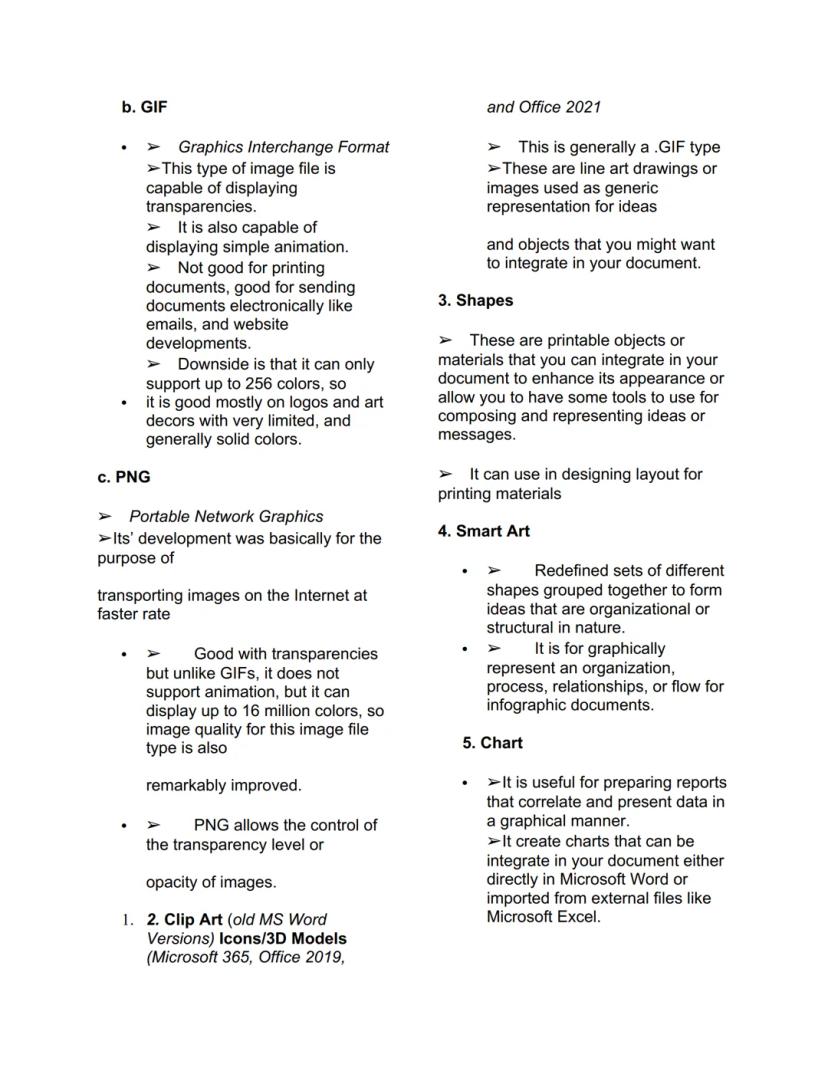
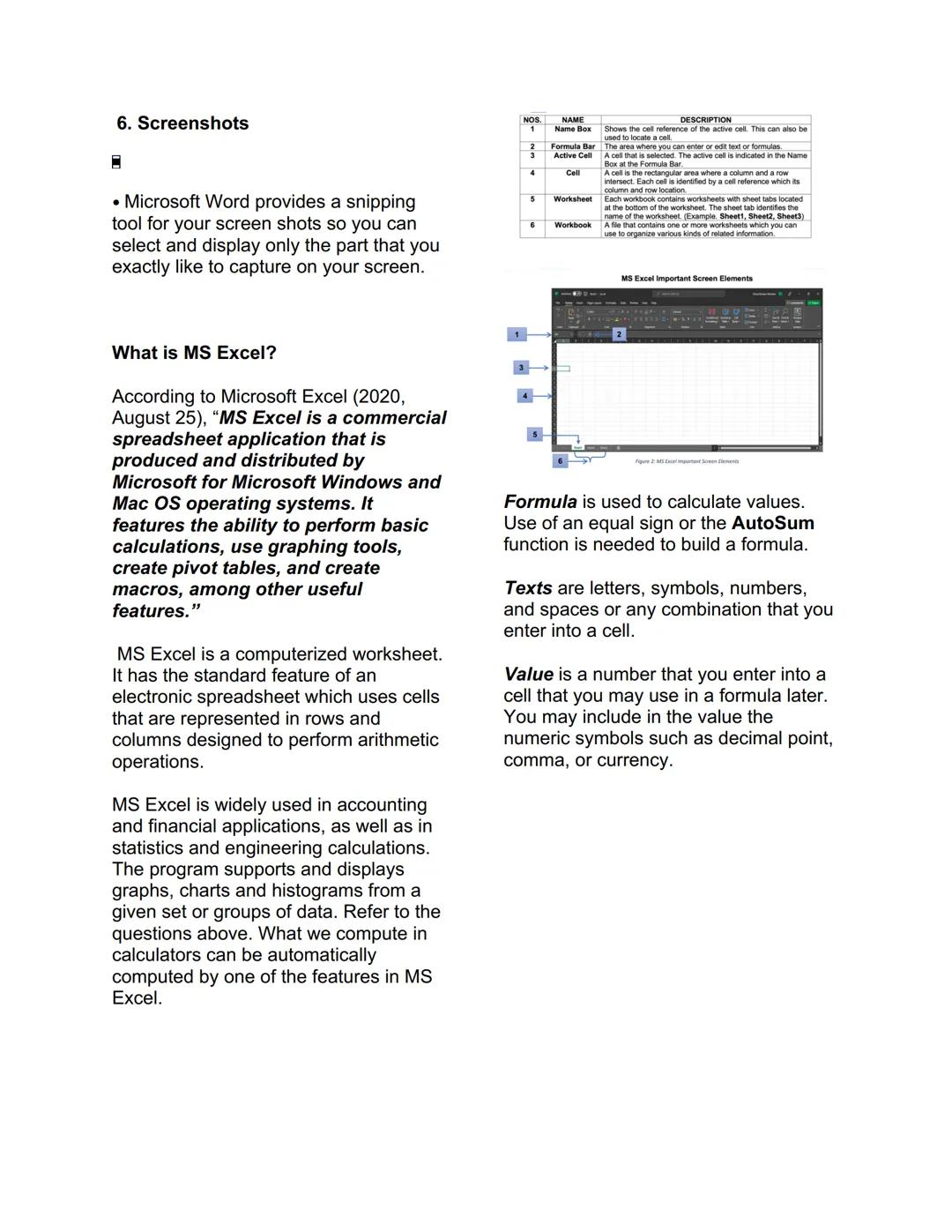
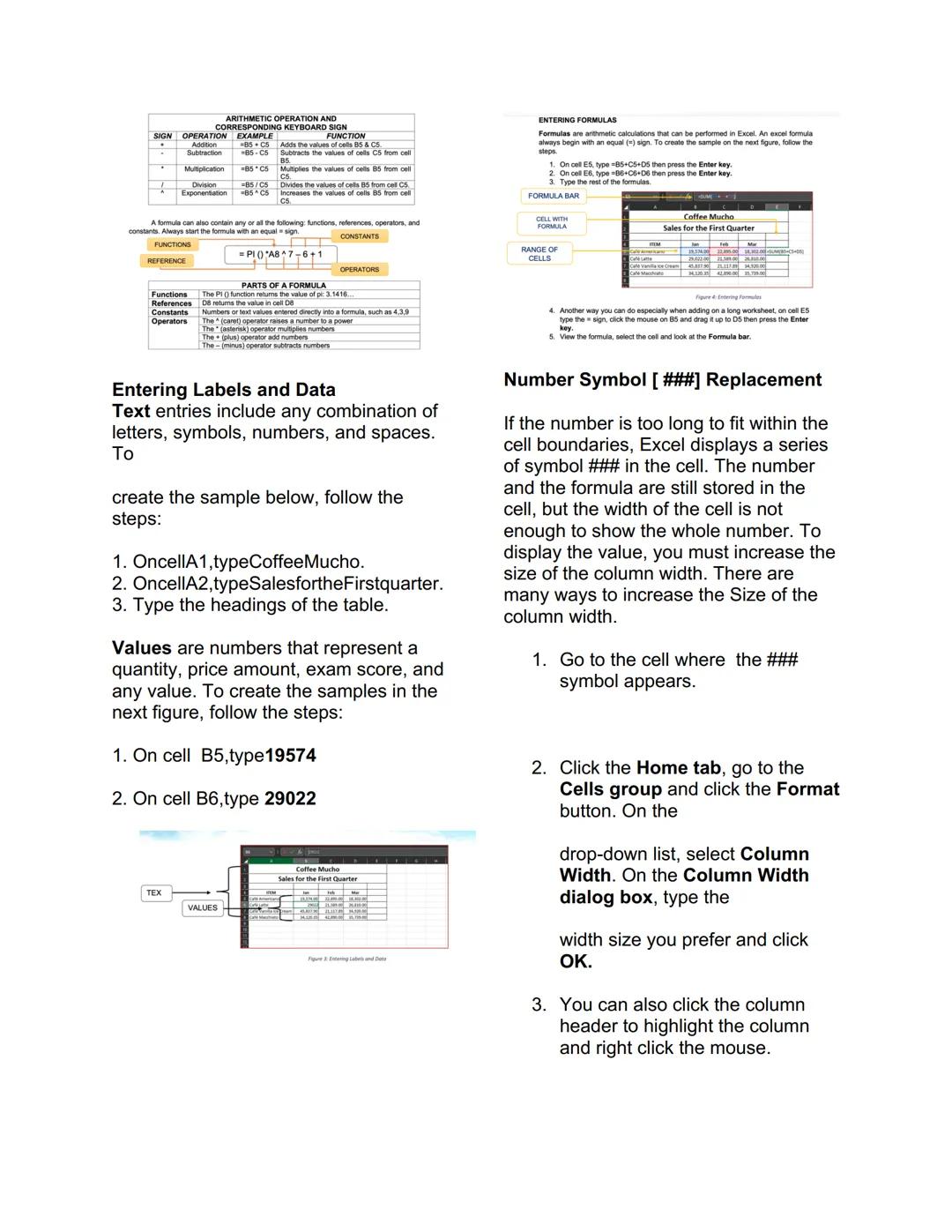
Ang basic arithmetic operations ay may corresponding keyboard signs: + (addition), - (subtraction), * (multiplication), / (division), at ^ (exponential). Lahat ng formulas ay nagsisimula sa equal (=) sign.

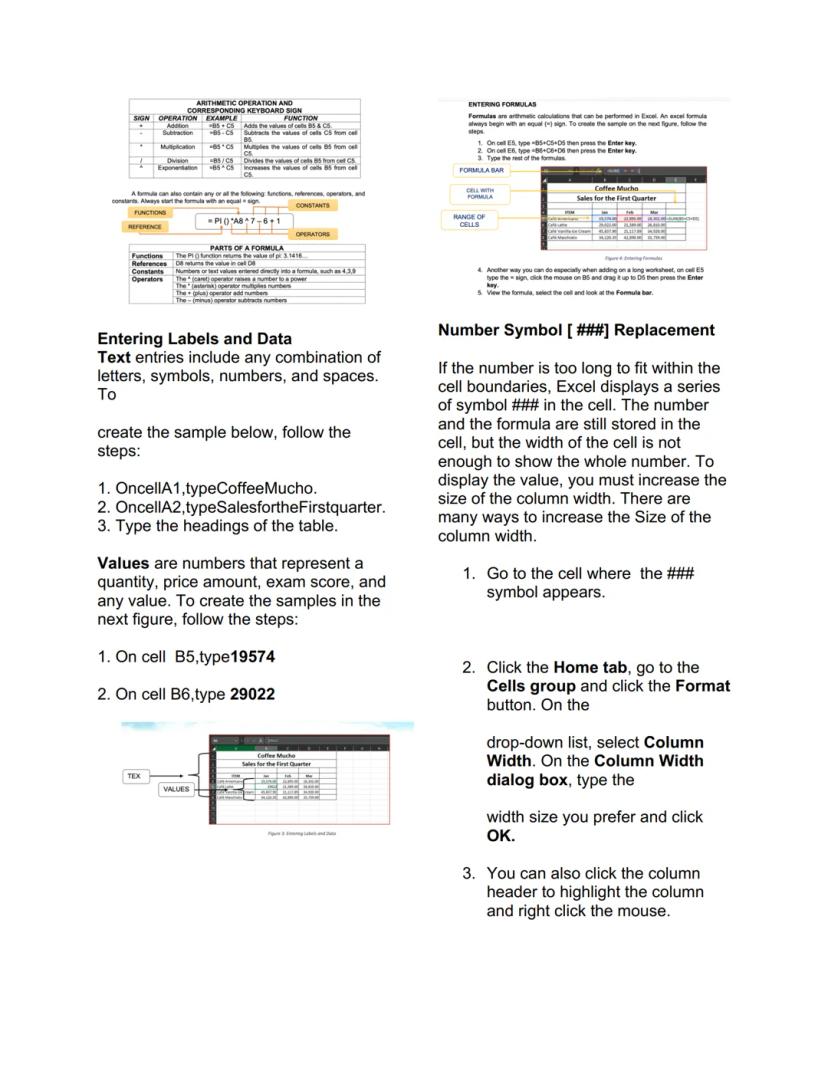
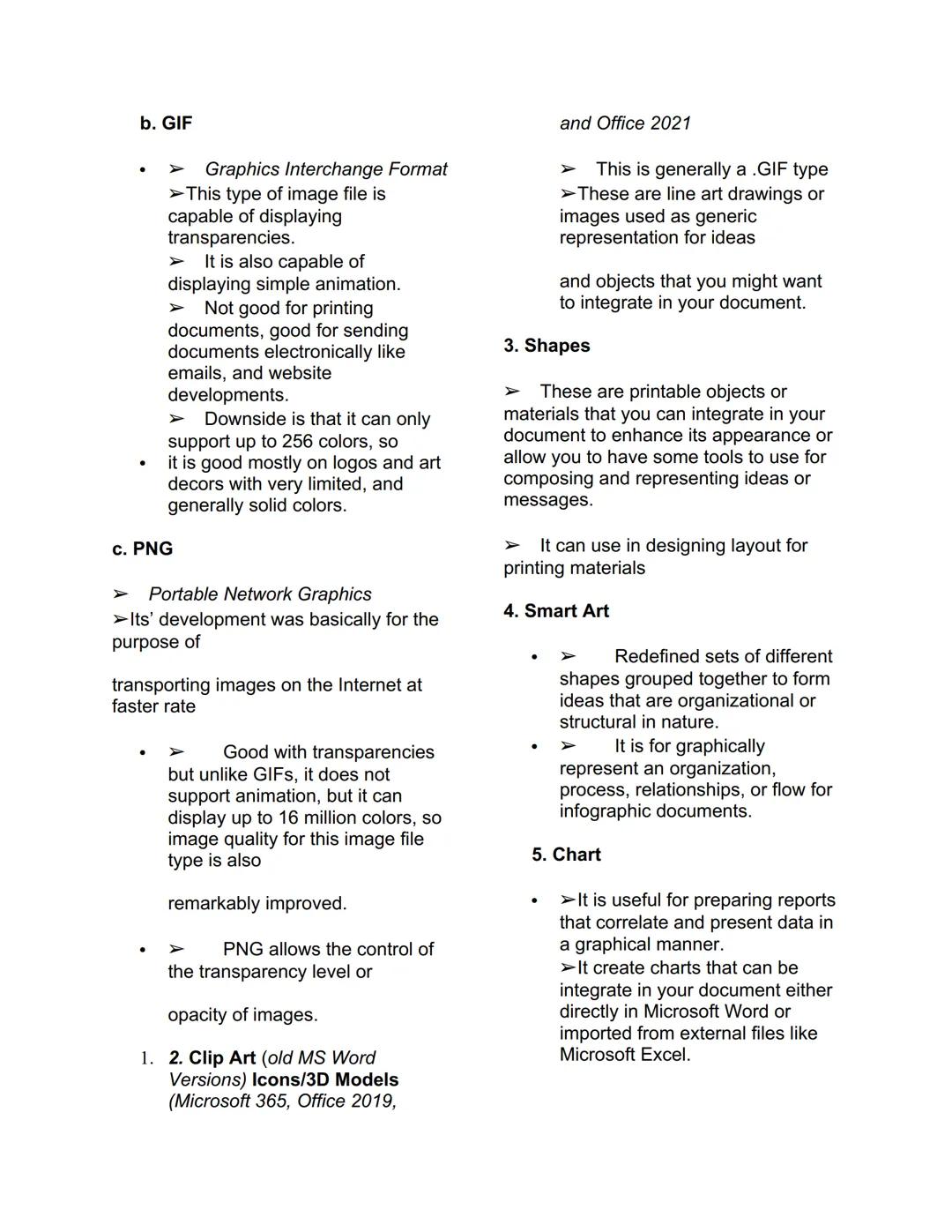
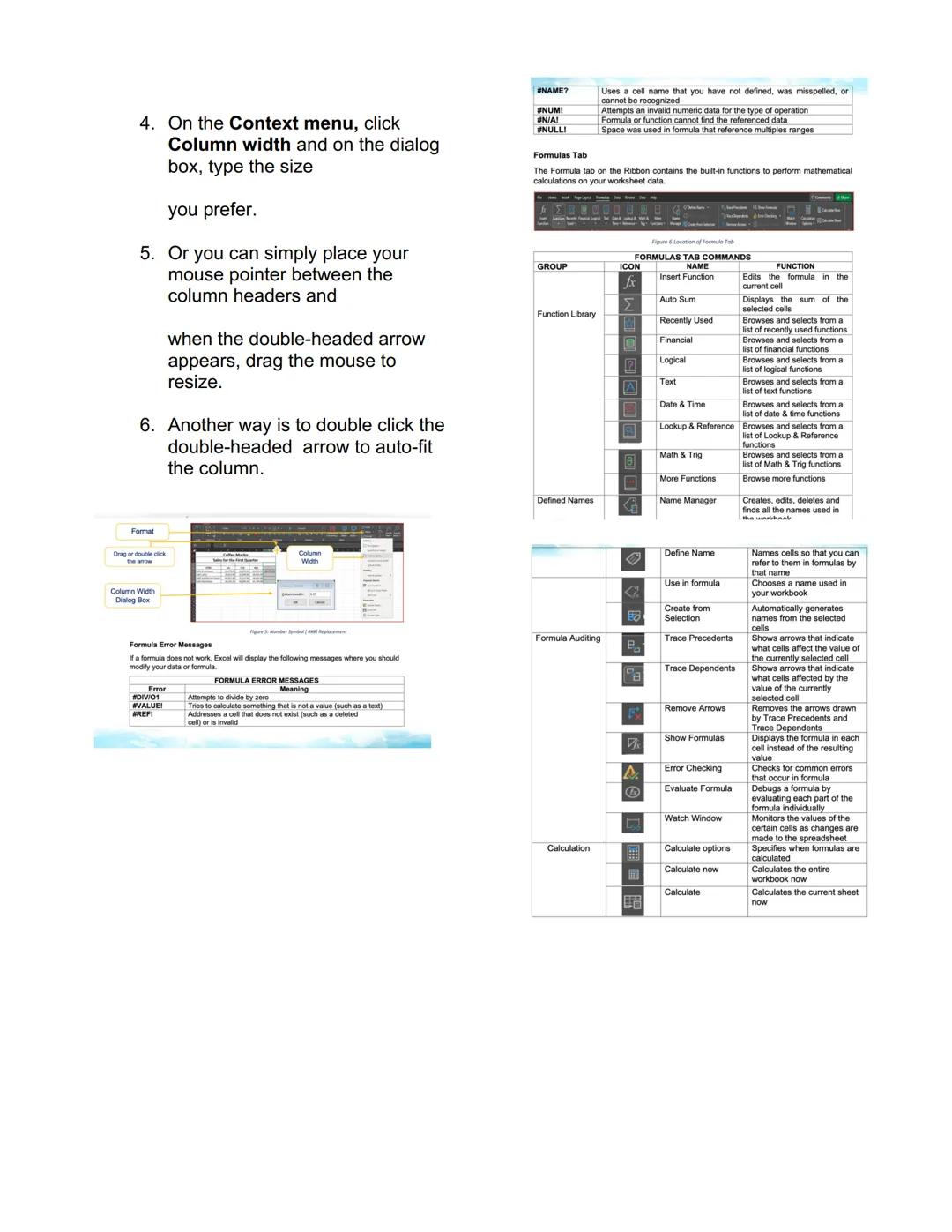
Sa pag-enter ng data, may labels (text entries) at values (numbers). Kapag masyadong mahaba ang number para sa cell, mag-a-appear ang ### symbols. Para ma-fix ito, i-adjust lang ang column width through Format > Column Width o drag lang ang border.

Excel Hack: Double-click ang border between column headers para mag-auto-fit ang width - walang manual adjustment needed!

## Mail Merge and Label Generation

A Mail Merge is a word processing
feature that allows you to easily create
multiple letters, labels, env

Excel Functions Categories

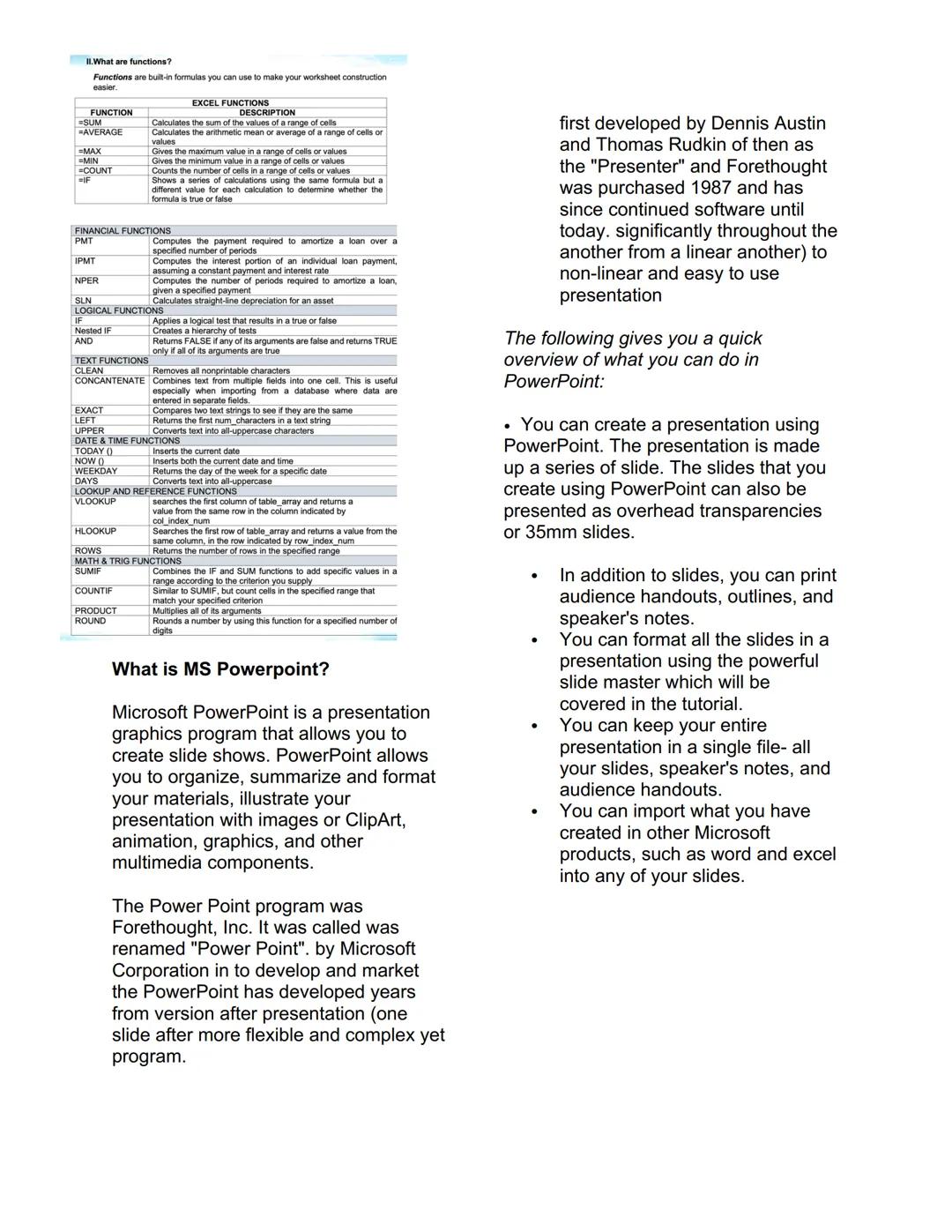
Ang functions ay built-in formulas na magpapadali sa worksheet construction mo. May iba't ibang categories: Basic (SUM, AVERAGE, MAX, MIN), Financial (PMT, IPMT), Logical (IF, AND), at Text functions (CONCATENATE, UPPER).

Ang Date & Time functions tulad ng TODAY() at NOW() ay nag-insert ng current date at time. Ang Lookup functions tulad ng VLOOKUP at HLOOKUP ay para sa data searching sa tables.

Sa Math & Trig functions, may SUMIF (conditional sum), COUNTIF (conditional count), PRODUCT (multiplication), at ROUND (rounding numbers). Ang bawat function ay may specific syntax na dapat sundin.

Function Master: Start with SUM, AVERAGE, at IF functions - 'yan ang pinaka-commonly used sa real work scenarios!

## Mail Merge and Label Generation

A Mail Merge is a word processing
feature that allows you to easily create
multiple letters, labels, env

MS PowerPoint Overview

Ang Microsoft PowerPoint ay presentation graphics program na ginagawa ni Dennis Austin at Thomas Rudkin ng Forethought, Inc. Originally called "Presenter," na-rename as "PowerPoint" nung binili ng Microsoft noong 1987.

Pwede kang gumawa ng slide shows, mag-organize ng materials, at mag-add ng images, animations, graphics, at multimedia components. Developed na siya from linear presentation (slide after slide) to non-linear and flexible presentation program.

Sa PowerPoint, pwede mong i-print ang audience handouts, outlines, at speaker's notes. May slide master feature para sa consistent formatting, at pwede mo ring i-import ang content from other Microsoft products like Word at Excel.

Presentation Pro: Gamitin ang slide master para sa consistent design sa lahat ng slides - professional tignan at time-efficient!

## Mail Merge and Label Generation

A Mail Merge is a word processing
feature that allows you to easily create
multiple letters, labels, env
## Mail Merge and Label Generation

A Mail Merge is a word processing
feature that allows you to easily create
multiple letters, labels, env


We thought you’d never ask...

What is the Knowunity AI companion?

Our AI companion is specifically built for the needs of students. Based on the millions of content pieces we have on the platform we can provide truly meaningful and relevant answers to students. But its not only about answers, the companion is even more about guiding students through their daily learning challenges, with personalised study plans, quizzes or content pieces in the chat and 100% personalisation based on the students skills and developments.

Where can I download the Knowunity app?

You can download the app in the Google Play Store and in the Apple App Store.

Is Knowunity really free of charge?

That's right! Enjoy free access to study content, connect with fellow students, and get instant help – all at your fingertips.

Can't find what you're looking for? Explore other subjects.

Students love us — and so will you.

4.9/5

App Store

4.8/5

Google Play

The app is very easy to use and well designed. I have found everything I was looking for so far and have been able to learn a lot from the presentations! I will definitely use the app for a class assignment! And of course it also helps a lot as an inspiration.

Stefan S

iOS user

This app is really great. There are so many study notes and help [...]. My problem subject is French, for example, and the app has so many options for help. Thanks to this app, I have improved my French. I would recommend it to anyone.

Samantha Klich

Android user

Wow, I am really amazed. I just tried the app because I've seen it advertised many times and was absolutely stunned. This app is THE HELP you want for school and above all, it offers so many things, such as workouts and fact sheets, which have been VERY helpful to me personally.

Anna

iOS user

I think it’s very much worth it and you’ll end up using it a lot once you get the hang of it and even after looking at others notes you can still ask your Artificial intelligence buddy the question and ask to simplify it if you still don’t get it!!! In the end I think it’s worth it 😊👍 ⚠️Also DID I MENTION ITS FREEE YOU DON’T HAVE TO PAY FOR ANYTHING AND STILL GET YOUR GRADES IN PERFECTLY❗️❗️⚠️

Thomas R

iOS user

Knowunity is the BEST app I’ve used in a minute. This is not an ai review or anything this is genuinely coming from a 7th grade student (I know 2011 im young) but dude this app is a 10/10 i have maintained a 3.8 gpa and have plenty of time for gaming. I love it and my mom is just happy I got good grades

Brad T

Android user

Not only did it help me find the answer but it also showed me alternative ways to solve it. I was horrible in math and science but now I have an a in both subjects. Thanks for the help🤍🤍

David K

iOS user

The app's just great! All I have to do is enter the topic in the search bar and I get the response real fast. I don't have to watch 10 YouTube videos to understand something, so I'm saving my time. Highly recommended!

Sudenaz Ocak

Android user

In school I was really bad at maths but thanks to the app, I am doing better now. I am so grateful that you made the app.

Greenlight Bonnie

Android user

I found this app a couple years ago and it has only gotten better since then. I really love it because it can help with written questions and photo questions. Also, it can find study guides that other people have made as well as flashcard sets and practice tests. The free version is also amazing for students who might not be able to afford it. Would 100% recommend

Aubrey

iOS user

Best app if you're in Highschool or Junior high. I have been using this app for 2 school years and it's the best, it's good if you don't have anyone to help you with school work.😋🩷🎀

Marco B

iOS user

THE QUIZES AND FLASHCARDS ARE SO USEFUL AND I LOVE THE SCHOOLGPT. IT ALSO IS LITREALLY LIKE CHATGPT BUT SMARTER!! HELPED ME WITH MY MASCARA PROBLEMS TOO!! AS WELL AS MY REAL SUBJECTS ! DUHHH 😍😁😲🤑💗✨🎀😮

Elisha

iOS user

This app is phenomenal down to the correct info and the various topics you can study! I greatly recommend it for people who struggle with procrastination and those who need homework help. It has been perfectly accurate for world 1 history as far as I’ve seen! Geometry too!

Paul T

iOS user

The app is very easy to use and well designed. I have found everything I was looking for so far and have been able to learn a lot from the presentations! I will definitely use the app for a class assignment! And of course it also helps a lot as an inspiration.

Stefan S

iOS user

This app is really great. There are so many study notes and help [...]. My problem subject is French, for example, and the app has so many options for help. Thanks to this app, I have improved my French. I would recommend it to anyone.

Samantha Klich

Android user

Wow, I am really amazed. I just tried the app because I've seen it advertised many times and was absolutely stunned. This app is THE HELP you want for school and above all, it offers so many things, such as workouts and fact sheets, which have been VERY helpful to me personally.

Anna

iOS user

I think it’s very much worth it and you’ll end up using it a lot once you get the hang of it and even after looking at others notes you can still ask your Artificial intelligence buddy the question and ask to simplify it if you still don’t get it!!! In the end I think it’s worth it 😊👍 ⚠️Also DID I MENTION ITS FREEE YOU DON’T HAVE TO PAY FOR ANYTHING AND STILL GET YOUR GRADES IN PERFECTLY❗️❗️⚠️

Thomas R

iOS user

Knowunity is the BEST app I’ve used in a minute. This is not an ai review or anything this is genuinely coming from a 7th grade student (I know 2011 im young) but dude this app is a 10/10 i have maintained a 3.8 gpa and have plenty of time for gaming. I love it and my mom is just happy I got good grades

Brad T

Android user

Not only did it help me find the answer but it also showed me alternative ways to solve it. I was horrible in math and science but now I have an a in both subjects. Thanks for the help🤍🤍

David K

iOS user

The app's just great! All I have to do is enter the topic in the search bar and I get the response real fast. I don't have to watch 10 YouTube videos to understand something, so I'm saving my time. Highly recommended!

Sudenaz Ocak

Android user

In school I was really bad at maths but thanks to the app, I am doing better now. I am so grateful that you made the app.

Greenlight Bonnie

Android user

I found this app a couple years ago and it has only gotten better since then. I really love it because it can help with written questions and photo questions. Also, it can find study guides that other people have made as well as flashcard sets and practice tests. The free version is also amazing for students who might not be able to afford it. Would 100% recommend

Aubrey

iOS user

Best app if you're in Highschool or Junior high. I have been using this app for 2 school years and it's the best, it's good if you don't have anyone to help you with school work.😋🩷🎀

Marco B

iOS user

THE QUIZES AND FLASHCARDS ARE SO USEFUL AND I LOVE THE SCHOOLGPT. IT ALSO IS LITREALLY LIKE CHATGPT BUT SMARTER!! HELPED ME WITH MY MASCARA PROBLEMS TOO!! AS WELL AS MY REAL SUBJECTS ! DUHHH 😍😁😲🤑💗✨🎀😮

Elisha

iOS user

This app is phenomenal down to the correct info and the various topics you can study! I greatly recommend it for people who struggle with procrastination and those who need homework help. It has been perfectly accurate for world 1 history as far as I’ve seen! Geometry too!

Paul T

iOS user


Iba pa

189

Dec 12, 2025

14 pages

ICT Basics Reviewer

M

Mikaela Caballes

@mikaelacaballes

Pag usapang computer applications, medyo nakakahilo ang daming dapat alamin, pero actually mas simple lang 'yan kaysa sa iniisip mo! Sa lesson na 'to, matutuhan mo yung mga essential features ng MS Word, Excel, at PowerPoint na magagamit mo sa... Show more

## Mail Merge and Label Generation

A Mail Merge is a word processing
feature that allows you to easily create
multiple letters, labels, env

Sign up to see the contentIt's free!

Access to all documents

Improve your grades

Join milions of students

By signing up you accept Terms of Service and Privacy Policy

Mail Merge, PowerPoint Animations, at Hyperlinks

Ang Mail Merge ay parang magic trick ng MS Word - ginagawa niyang madali ang paglikha ng maraming personalized na documents. Kailangan mo lang ng main document (yung letter template) at data source (yung list ng names at addresses sa Excel). Ang merge document naman yung final output mo after ng process.

Sa PowerPoint, ang animations ay nagbibigay-buhay sa presentations mo. May apat na categories: Entrance, Emphasis, Exit, at Motion Paths. Para mag-add ng animation, pumunta lang sa Animations Tab at click ang Add Animations.

Ang hyperlinks naman ay mga clickable na text o images na magdadala sa'yo sa ibang slide, file, o webpage. Makikilala mo sila sa blue at underlined na text, at pag nag-hover ka ng mouse, magiging pointing hand yung cursor.

Pro Tip: Gamitin ang Mail Merge para sa mga class invitations o certificates - mas efficient kaysa sa isa-isang pag-type!

## Mail Merge and Label Generation

A Mail Merge is a word processing
feature that allows you to easily create
multiple letters, labels, env

Sign up to see the contentIt's free!

Access to all documents

Improve your grades

Join milions of students

By signing up you accept Terms of Service and Privacy Policy

Excel Formulas at Functions

Ang Excel ay hindi lang para sa simple calculations - kaya niyang mag-handle ng complex formulas gamit ang PEMDAS rule. Remember: Parenthesis, Exponents, Multiplication, Division, Addition, Subtraction - same sa Math class mo!

May tatlong types ng cell references: Relative nagbabagokapagnacopynagbabago kapag na-copy, Absolute (hindi nagbabago, may $ sign), at Mixed (may $ sa row o column lang). Ang functions naman ay pre-made formulas na magpapadali sa work mo.

Ang IF function ay nagde-decide based sa condition mo: =IFlogicaltest,valueiftrue,valueiffalselogical_test, value_if_true, value_if_false. Ang VLOOKUP naman ay nag-search ng value sa table at nagre-return ng corresponding data - super useful sa data analysis!

Lifesaver Alert: Master mo ang VLOOKUP kasi laging ginagamit 'yan sa work - parang Google search pero sa Excel!

## Mail Merge and Label Generation

A Mail Merge is a word processing
feature that allows you to easily create
multiple letters, labels, env

Sign up to see the contentIt's free!

Access to all documents

Improve your grades

Join milions of students

By signing up you accept Terms of Service and Privacy Policy

MS Word Basics at Features

Ang MS Word ay ginawa ni Charles Simonyi at Richard Brodie noong 1983, originally called "Multi-Tool Word." Ngayon, isa sa pinaka-widely used na word processors worldwide at part ng MS Office Suite.

Sobrang versatile ng Word - pwede mo gamitin sa education para sa assignments at notes, sa workplace para sa reports at letters, at sa pag-create ng professional resumes. Para sa mga aspiring authors, may built-in features para sa bibliography at table of contents.

Sa productivity, ang MS Word ay considered na essential tool. May .doc extension ang files niya, at available siya both sa Windows at Mac. Kung nag-start ka pa lang sa computer applications, ito usually ang unang natutuhan.

Career Boost: Ang MS Word skills ay basic requirement sa lahat ng jobs ngayon - invest time mo rito!

## Mail Merge and Label Generation

A Mail Merge is a word processing
feature that allows you to easily create
multiple letters, labels, env

Sign up to see the contentIt's free!

Access to all documents

Improve your grades

Join milions of students

By signing up you accept Terms of Service and Privacy Policy

Mail Merge Process at Components

Ang Mail Merge ay may dalawang main components: Form Document (main body ng message mo) at Data File yungindividualinfonaipaplugmoyung individual info na ipa-plug mo. Ang form document ay may mga merge fields na marked ng <<<>>><<<>>> signs.

Para mag-create ng recipient list, go to Mailings tab > Start group > Select Recipients > Type New List. Sa New Address List dialog box, pwede mo i-customize ang columns at mag-add ng new entries. Para mag-edit, click lang ang Edit Recipient List.

Ang step-by-step process ay simple: select starting document, choose recipients (create new list o use existing), then merge na! Pwede kang mag-save ng address list para ma-reuse mo sa future projects.

Time Saver: Once na-setup mo ang data file, pwede mo siyang gamitin ulit para sa iba't ibang mail merge projects!

## Mail Merge and Label Generation

A Mail Merge is a word processing
feature that allows you to easily create
multiple letters, labels, env

Sign up to see the contentIt's free!

Access to all documents

Improve your grades

Join milions of students

By signing up you accept Terms of Service and Privacy Policy

Image Types at Materials sa Documents

Sa pag-insert ng pictures, may tatlong main types: JPEG/JPG (16.7 million colors, small size, walang transparency), GIF (may transparency at animation, 256 colors lang), at PNG (best quality, may transparency control, 16 million colors).

Ang Clip Art (sa old versions) o Icons/3D Models (sa newer versions) ay mga generic representations para sa ideas. Ang Shapes naman ay printable objects na pwede mong gamitin para sa layout design.

Ang Smart Art ay pre-designed groups ng shapes para sa organizational charts at processes. May Chart feature din para sa data presentation, at Screenshots tool para sa screen captures with snipping functionality.

Design Tip: Gamitin ang PNG para sa logos at graphics na may transparency, JPEG para sa photos na i-email mo!

## Mail Merge and Label Generation

A Mail Merge is a word processing
feature that allows you to easily create
multiple letters, labels, env

Sign up to see the contentIt's free!

Access to all documents

Improve your grades

Join milions of students

By signing up you accept Terms of Service and Privacy Policy

MS Excel Fundamentals

Ang MS Excel ay isang commercial spreadsheet application na ginagamit sa accounting, financial applications, statistics, at engineering calculations. Ito ay computerized worksheet na may cells arranged in rows at columns.

Ang basic arithmetic operations ay may corresponding keyboard signs: + (addition), - (subtraction), * (multiplication), / (division), at ^ (exponential). Lahat ng formulas ay nagsisimula sa equal (=) sign.

Sa pag-enter ng data, may labels (text entries) at values (numbers). Kapag masyadong mahaba ang number para sa cell, mag-a-appear ang ### symbols. Para ma-fix ito, i-adjust lang ang column width through Format > Column Width o drag lang ang border.

Excel Hack: Double-click ang border between column headers para mag-auto-fit ang width - walang manual adjustment needed!

## Mail Merge and Label Generation

A Mail Merge is a word processing
feature that allows you to easily create
multiple letters, labels, env

Sign up to see the contentIt's free!

Access to all documents

Improve your grades

Join milions of students

By signing up you accept Terms of Service and Privacy Policy

Excel Functions Categories

Ang functions ay built-in formulas na magpapadali sa worksheet construction mo. May iba't ibang categories: Basic (SUM, AVERAGE, MAX, MIN), Financial (PMT, IPMT), Logical (IF, AND), at Text functions (CONCATENATE, UPPER).

Ang Date & Time functions tulad ng TODAY() at NOW() ay nag-insert ng current date at time. Ang Lookup functions tulad ng VLOOKUP at HLOOKUP ay para sa data searching sa tables.

Sa Math & Trig functions, may SUMIF (conditional sum), COUNTIF (conditional count), PRODUCT (multiplication), at ROUND (rounding numbers). Ang bawat function ay may specific syntax na dapat sundin.

Function Master: Start with SUM, AVERAGE, at IF functions - 'yan ang pinaka-commonly used sa real work scenarios!

## Mail Merge and Label Generation

A Mail Merge is a word processing
feature that allows you to easily create
multiple letters, labels, env

Sign up to see the contentIt's free!

Access to all documents

Improve your grades

Join milions of students

By signing up you accept Terms of Service and Privacy Policy

MS PowerPoint Overview

Ang Microsoft PowerPoint ay presentation graphics program na ginagawa ni Dennis Austin at Thomas Rudkin ng Forethought, Inc. Originally called "Presenter," na-rename as "PowerPoint" nung binili ng Microsoft noong 1987.

Pwede kang gumawa ng slide shows, mag-organize ng materials, at mag-add ng images, animations, graphics, at multimedia components. Developed na siya from linear presentation (slide after slide) to non-linear and flexible presentation program.

Sa PowerPoint, pwede mong i-print ang audience handouts, outlines, at speaker's notes. May slide master feature para sa consistent formatting, at pwede mo ring i-import ang content from other Microsoft products like Word at Excel.

Presentation Pro: Gamitin ang slide master para sa consistent design sa lahat ng slides - professional tignan at time-efficient!

## Mail Merge and Label Generation

A Mail Merge is a word processing
feature that allows you to easily create
multiple letters, labels, env

Sign up to see the contentIt's free!

Access to all documents

Improve your grades

Join milions of students

By signing up you accept Terms of Service and Privacy Policy

## Mail Merge and Label Generation

A Mail Merge is a word processing
feature that allows you to easily create
multiple letters, labels, env

Sign up to see the contentIt's free!

Access to all documents

Improve your grades

Join milions of students

By signing up you accept Terms of Service and Privacy Policy

We thought you’d never ask...

What is the Knowunity AI companion?

Our AI companion is specifically built for the needs of students. Based on the millions of content pieces we have on the platform we can provide truly meaningful and relevant answers to students. But its not only about answers, the companion is even more about guiding students through their daily learning challenges, with personalised study plans, quizzes or content pieces in the chat and 100% personalisation based on the students skills and developments.

Where can I download the Knowunity app?

You can download the app in the Google Play Store and in the Apple App Store.

Is Knowunity really free of charge?

That's right! Enjoy free access to study content, connect with fellow students, and get instant help – all at your fingertips.

1

Smart Tools NEW

Transform this note into: ✓ 50+ Practice Questions ✓ Interactive Flashcards ✓ Full Mock Exam ✓ Essay Outlines

Mock Exam
Quiz
Flashcards
Essay

Can't find what you're looking for? Explore other subjects.

Students love us — and so will you.

4.9/5

App Store

4.8/5

Google Play

The app is very easy to use and well designed. I have found everything I was looking for so far and have been able to learn a lot from the presentations! I will definitely use the app for a class assignment! And of course it also helps a lot as an inspiration.

Stefan S

iOS user

This app is really great. There are so many study notes and help [...]. My problem subject is French, for example, and the app has so many options for help. Thanks to this app, I have improved my French. I would recommend it to anyone.

Samantha Klich

Android user

Wow, I am really amazed. I just tried the app because I've seen it advertised many times and was absolutely stunned. This app is THE HELP you want for school and above all, it offers so many things, such as workouts and fact sheets, which have been VERY helpful to me personally.

Anna

iOS user

I think it’s very much worth it and you’ll end up using it a lot once you get the hang of it and even after looking at others notes you can still ask your Artificial intelligence buddy the question and ask to simplify it if you still don’t get it!!! In the end I think it’s worth it 😊👍 ⚠️Also DID I MENTION ITS FREEE YOU DON’T HAVE TO PAY FOR ANYTHING AND STILL GET YOUR GRADES IN PERFECTLY❗️❗️⚠️

Thomas R

iOS user

Knowunity is the BEST app I’ve used in a minute. This is not an ai review or anything this is genuinely coming from a 7th grade student (I know 2011 im young) but dude this app is a 10/10 i have maintained a 3.8 gpa and have plenty of time for gaming. I love it and my mom is just happy I got good grades

Brad T

Android user

Not only did it help me find the answer but it also showed me alternative ways to solve it. I was horrible in math and science but now I have an a in both subjects. Thanks for the help🤍🤍

David K

iOS user

The app's just great! All I have to do is enter the topic in the search bar and I get the response real fast. I don't have to watch 10 YouTube videos to understand something, so I'm saving my time. Highly recommended!

Sudenaz Ocak

Android user

In school I was really bad at maths but thanks to the app, I am doing better now. I am so grateful that you made the app.

Greenlight Bonnie

Android user

I found this app a couple years ago and it has only gotten better since then. I really love it because it can help with written questions and photo questions. Also, it can find study guides that other people have made as well as flashcard sets and practice tests. The free version is also amazing for students who might not be able to afford it. Would 100% recommend

Aubrey

iOS user

Best app if you're in Highschool or Junior high. I have been using this app for 2 school years and it's the best, it's good if you don't have anyone to help you with school work.😋🩷🎀

Marco B

iOS user

THE QUIZES AND FLASHCARDS ARE SO USEFUL AND I LOVE THE SCHOOLGPT. IT ALSO IS LITREALLY LIKE CHATGPT BUT SMARTER!! HELPED ME WITH MY MASCARA PROBLEMS TOO!! AS WELL AS MY REAL SUBJECTS ! DUHHH 😍😁😲🤑💗✨🎀😮

Elisha

iOS user

This app is phenomenal down to the correct info and the various topics you can study! I greatly recommend it for people who struggle with procrastination and those who need homework help. It has been perfectly accurate for world 1 history as far as I’ve seen! Geometry too!

Paul T

iOS user

The app is very easy to use and well designed. I have found everything I was looking for so far and have been able to learn a lot from the presentations! I will definitely use the app for a class assignment! And of course it also helps a lot as an inspiration.

Stefan S

iOS user

This app is really great. There are so many study notes and help [...]. My problem subject is French, for example, and the app has so many options for help. Thanks to this app, I have improved my French. I would recommend it to anyone.

Samantha Klich

Android user

Wow, I am really amazed. I just tried the app because I've seen it advertised many times and was absolutely stunned. This app is THE HELP you want for school and above all, it offers so many things, such as workouts and fact sheets, which have been VERY helpful to me personally.

Anna

iOS user

I think it’s very much worth it and you’ll end up using it a lot once you get the hang of it and even after looking at others notes you can still ask your Artificial intelligence buddy the question and ask to simplify it if you still don’t get it!!! In the end I think it’s worth it 😊👍 ⚠️Also DID I MENTION ITS FREEE YOU DON’T HAVE TO PAY FOR ANYTHING AND STILL GET YOUR GRADES IN PERFECTLY❗️❗️⚠️

Thomas R

iOS user

Knowunity is the BEST app I’ve used in a minute. This is not an ai review or anything this is genuinely coming from a 7th grade student (I know 2011 im young) but dude this app is a 10/10 i have maintained a 3.8 gpa and have plenty of time for gaming. I love it and my mom is just happy I got good grades

Brad T

Android user

Not only did it help me find the answer but it also showed me alternative ways to solve it. I was horrible in math and science but now I have an a in both subjects. Thanks for the help🤍🤍

David K

iOS user

The app's just great! All I have to do is enter the topic in the search bar and I get the response real fast. I don't have to watch 10 YouTube videos to understand something, so I'm saving my time. Highly recommended!

Sudenaz Ocak

Android user

In school I was really bad at maths but thanks to the app, I am doing better now. I am so grateful that you made the app.

Greenlight Bonnie

Android user

I found this app a couple years ago and it has only gotten better since then. I really love it because it can help with written questions and photo questions. Also, it can find study guides that other people have made as well as flashcard sets and practice tests. The free version is also amazing for students who might not be able to afford it. Would 100% recommend

Aubrey

iOS user

Best app if you're in Highschool or Junior high. I have been using this app for 2 school years and it's the best, it's good if you don't have anyone to help you with school work.😋🩷🎀

Marco B

iOS user

THE QUIZES AND FLASHCARDS ARE SO USEFUL AND I LOVE THE SCHOOLGPT. IT ALSO IS LITREALLY LIKE CHATGPT BUT SMARTER!! HELPED ME WITH MY MASCARA PROBLEMS TOO!! AS WELL AS MY REAL SUBJECTS ! DUHHH 😍😁😲🤑💗✨🎀😮

Elisha

iOS user

This app is phenomenal down to the correct info and the various topics you can study! I greatly recommend it for people who struggle with procrastination and those who need homework help. It has been perfectly accurate for world 1 history as far as I’ve seen! Geometry too!

Paul T

iOS user