
A computer system is a collection of hardware, software, and... Show more
 TLE
TLE Fun Stuff
 Algebra
Sign up to see the contentIt's free!
Access to all documents
Improve your grades
Join milions of students
Knowunity AI
Subjects
Triangle Congruence and Similarity Theorems
Triangle Properties and Classification
Linear Equations and Graphs
Geometric Angle Relationships
Trigonometric Functions and Identities
Equation Solving Techniques
Circle Geometry Fundamentals
Division Operations and Methods
Basic Differentiation Rules
Exponent and Logarithm Properties
Show all topics
Human Organ Systems
Reproductive Cell Cycles
Biological Sciences Subdisciplines
Cellular Energy Metabolism
Autotrophic Energy Processes
Inheritance Patterns and Principles
Biomolecular Structure and Organization
Cell Cycle and Division Mechanics
Cellular Organization and Development
Biological Structural Organization
Show all topics
Chemical Sciences and Applications
Atomic Structure and Composition
Molecular Electron Structure Representation
Atomic Electron Behavior
Matter Properties and Water
Mole Concept and Calculations
Gas Laws and Behavior
Periodic Table Organization
Chemical Thermodynamics Fundamentals
Chemical Bond Types and Properties
Show all topics
European Renaissance and Enlightenment
European Cultural Movements 800-1920
American Revolution Era 1763-1797
American Civil War 1861-1865
Global Imperial Systems
Mongol and Chinese Dynasties
U.S. Presidents and World Leaders
Historical Sources and Documentation
World Wars Era and Impact
World Religious Systems
Show all topics
Classic and Contemporary Novels
Literary Character Analysis
Rhetorical Theory and Practice
Classic Literary Narratives
Reading Analysis and Interpretation
Narrative Structure and Techniques
English Language Components
Influential English-Language Authors
Basic Sentence Structure
Narrative Voice and Perspective
Show all topics
168
•
Feb 10, 2026
•

Ann Villamor
@annevillamor_sun
A computer system is a collection of hardware, software, and... Show more
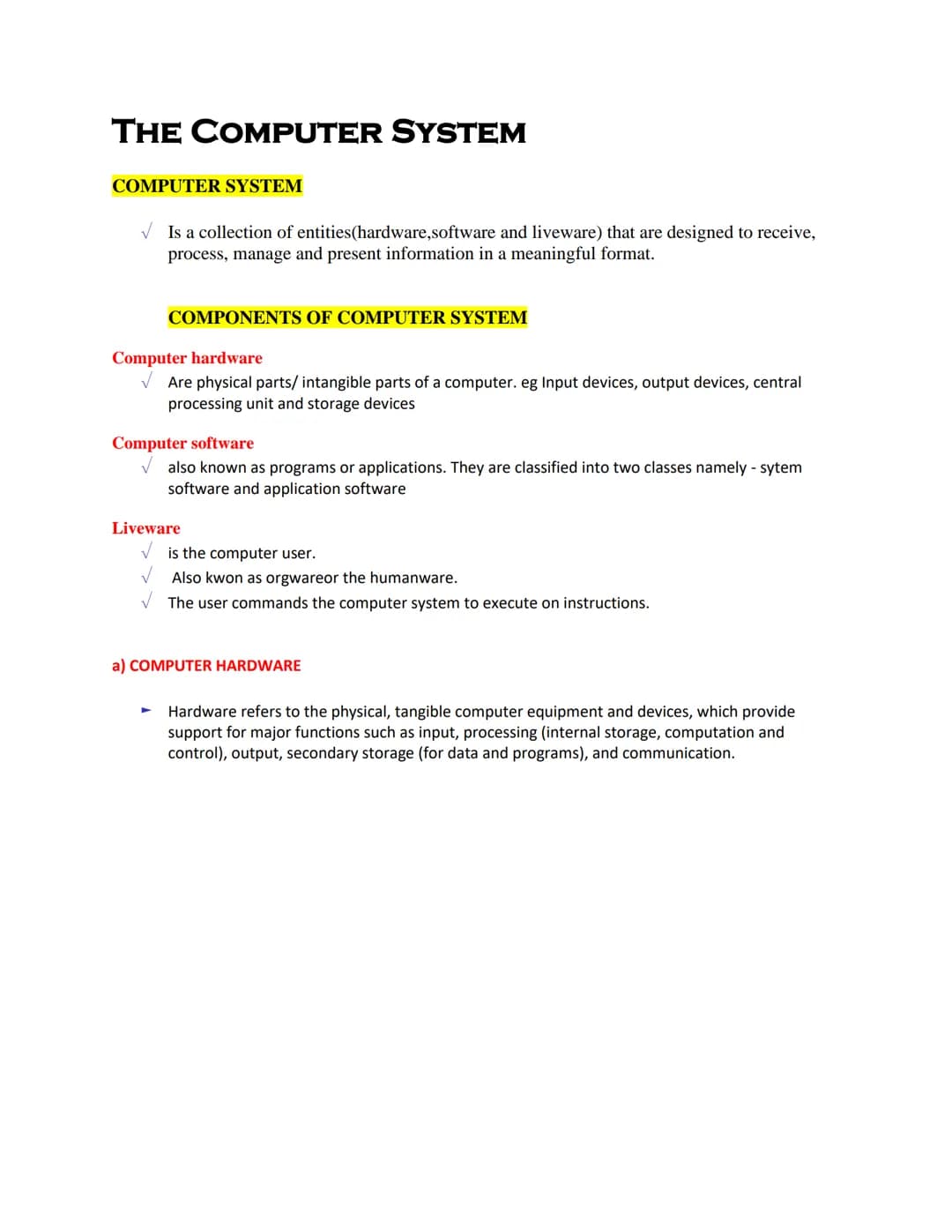
Ever wonder what makes your computer actually work? A computer system is more than just the machine on your desk—it's a collection of hardware, software, and liveware (humans!) designed to process and present information in useful ways.
The system has three main components. Computer hardware refers to the physical parts you can touch, like input devices, output devices, and the central processing unit. Computer software includes programs and applications that tell the hardware what to do, falling into two categories: system software and application software.
Don't forget the most important part—you! Liveware (also called orgware or humanware) refers to the computer user who gives commands to the system. Without users, computers would just be expensive paperweights.
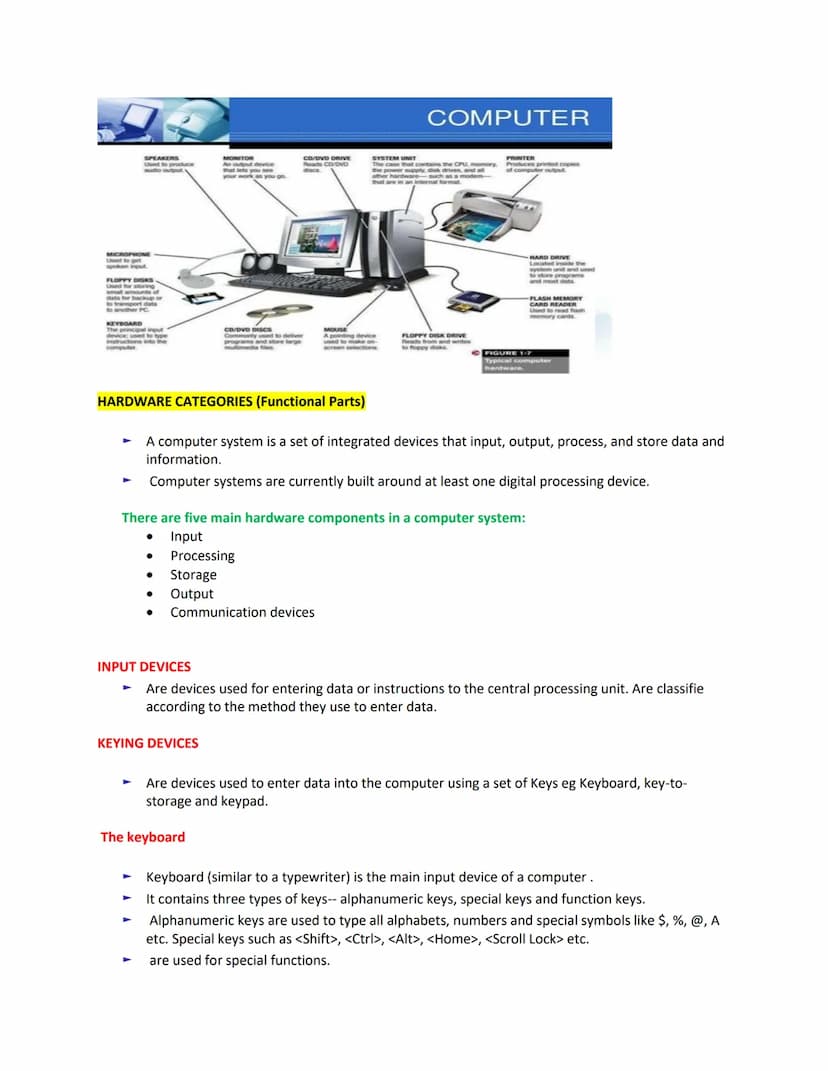
💡 Quick Fact: Hardware provides five essential functions: input, processing, storage, output, and communication—each part working together to make your digital experience possible.
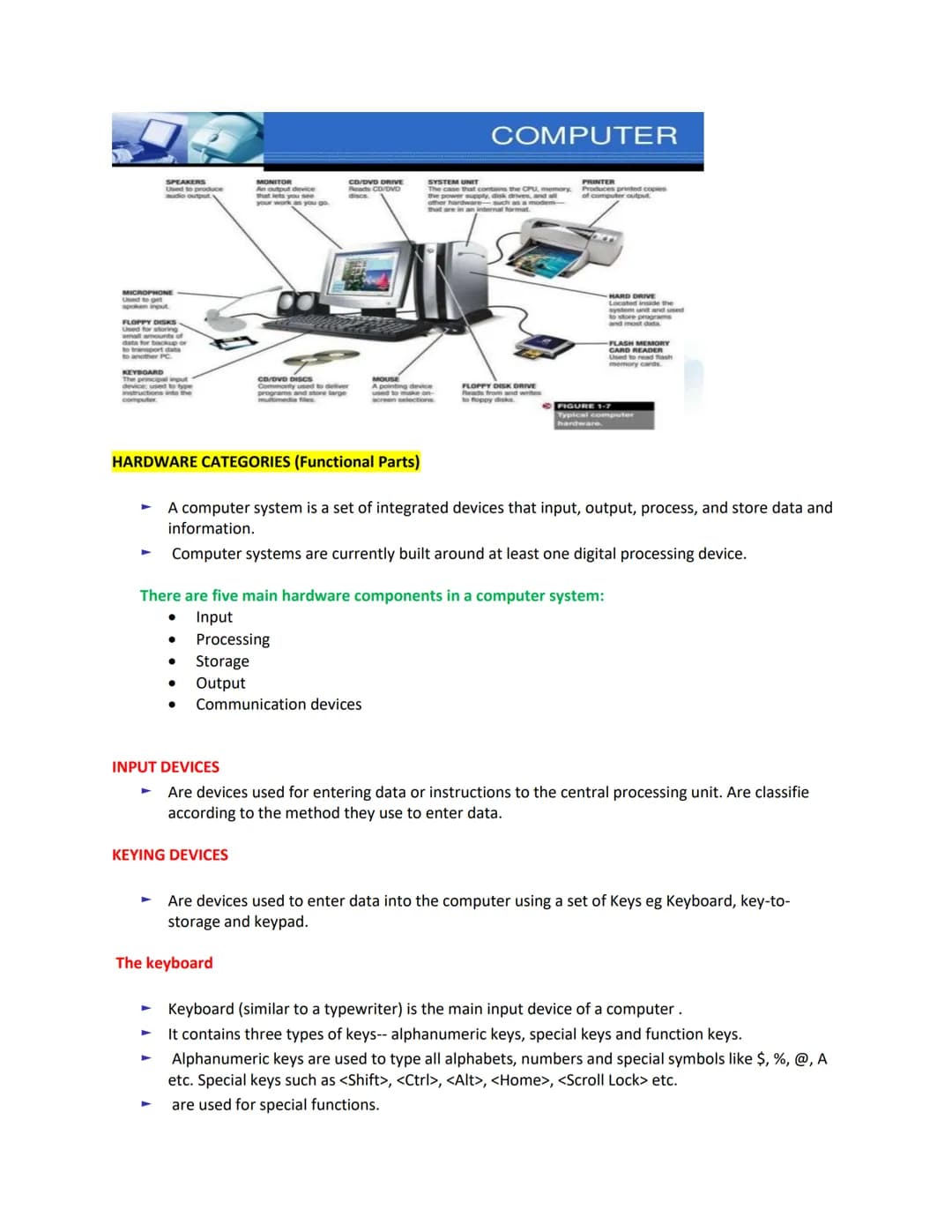
Think of your computer as a team of specialized players, each with a specific job. Computer hardware falls into five main functional parts that work together to make everything happen.
The most basic components include:
Input devices are what you use to enter data or instructions. The most common input device is the keyboard, which contains three types of keys: alphanumeric keys (letters, numbers, symbols), special keys (Shift, Ctrl, Alt), and function keys .
When you press a key, the keyboard creates an electronic signal that's converted into a binary code the computer can understand. While there are many keyboard types, the standard 101-key keyboard remains the most widely used.
🔑 Remember this: Every input device, whether simple like a keyboard or advanced like a touchscreen, serves the same purpose—translating your human actions into language the computer understands.
Your keyboard is organized into functional groups to make computing easier. The typing keys include all the letters, numbers, and symbols found on traditional typewriters. Special control keys like CTRL, ALT, and ESC are used alone or in combination to perform specific actions.
Function keys perform different tasks depending on the program you're using. Navigation keys help you move around documents and edit text, while the numeric keypad makes entering numbers quick and easy—just like on a calculator!
Beyond keyboards, pointing devices let you interact with on-screen items directly. The most common is the mouse, which lets you point to and select items on your screen. Using a mouse becomes second nature once you learn its four basic actions:
👉 Pro tip: When you're not sure what to do with something on your screen, try right-clicking it! This almost always reveals a menu of useful options specific to whatever you clicked on.
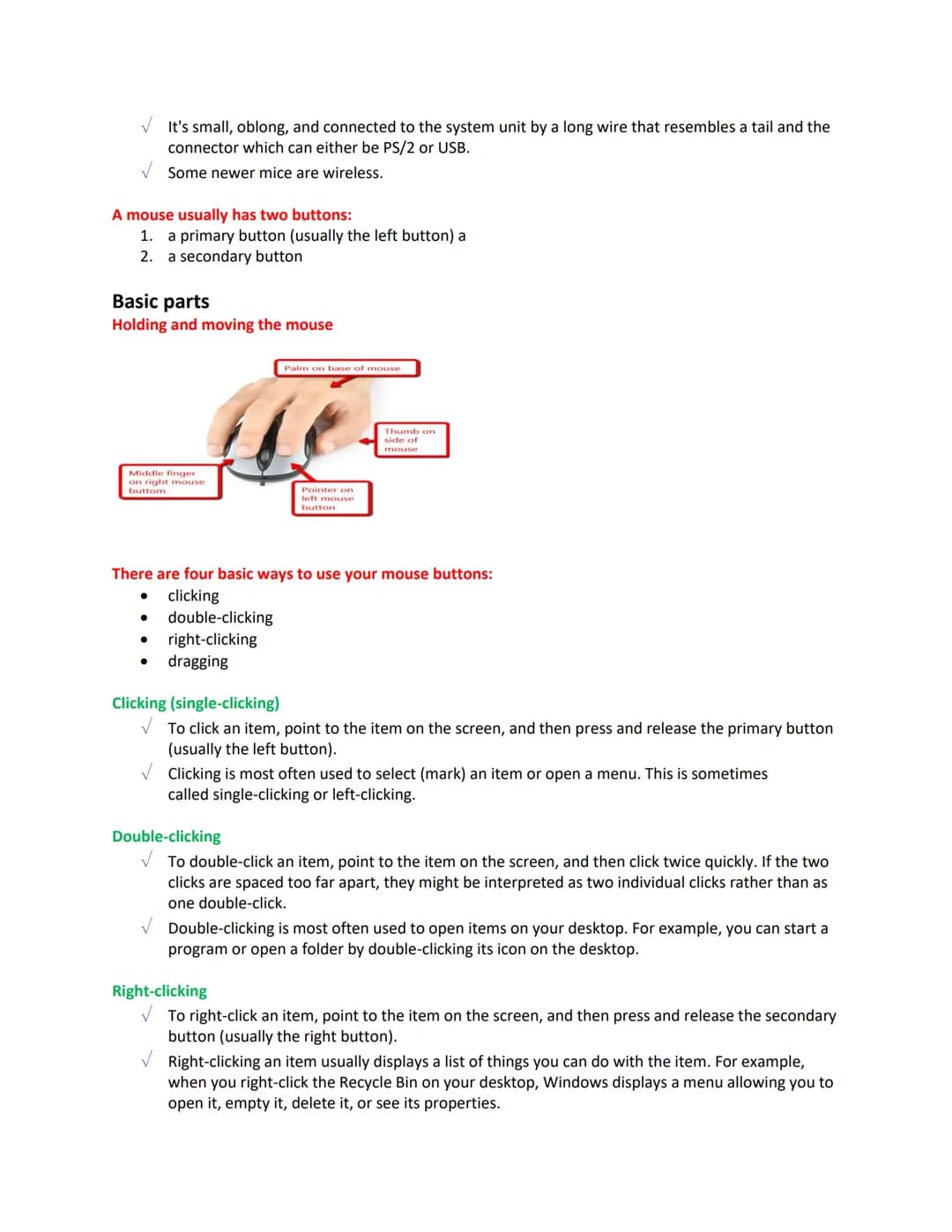
Your mouse is a small but mighty tool for interacting with your computer. It's typically connected by a wire (though wireless versions are common now) and has two main buttons—a primary (left) button and secondary (right) button.
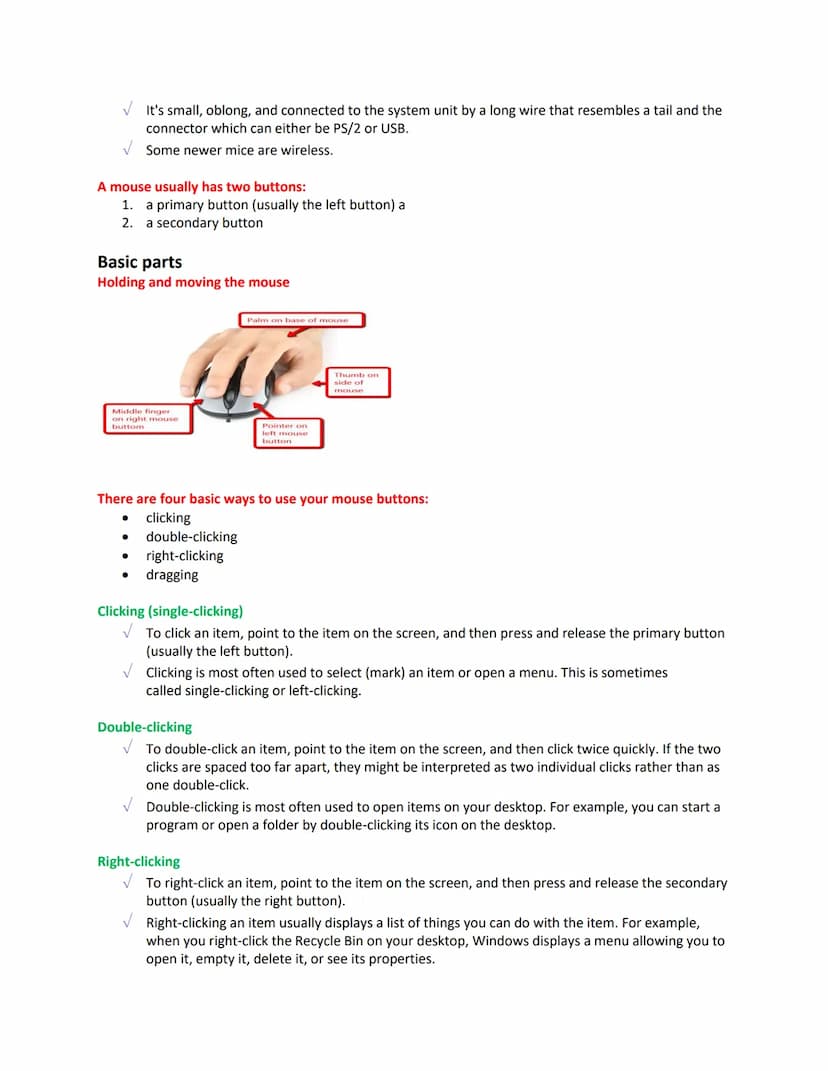
Learning proper mouse technique is important for comfortable computing. Rest your palm on the base with your index finger on the left button and middle finger on the right button. Your thumb stays along the side for stability and control as you move the mouse around.
The four basic mouse actions—clicking, double-clicking, right-clicking and dragging—become your go-to moves for nearly everything you do on a computer. Clicking selects items, double-clicking opens them, right-clicking shows options, and dragging moves things around.
When double-clicking, make sure your clicks are quick and your mouse doesn't move between clicks. If they're too far apart, the computer might interpret them as two separate clicks instead of one double-click.
🖱️ Mouse mastery: For most people, becoming comfortable with a mouse takes practice. If you're new to using one, try simple games like Solitaire that require pointing and clicking to build your coordination skills.
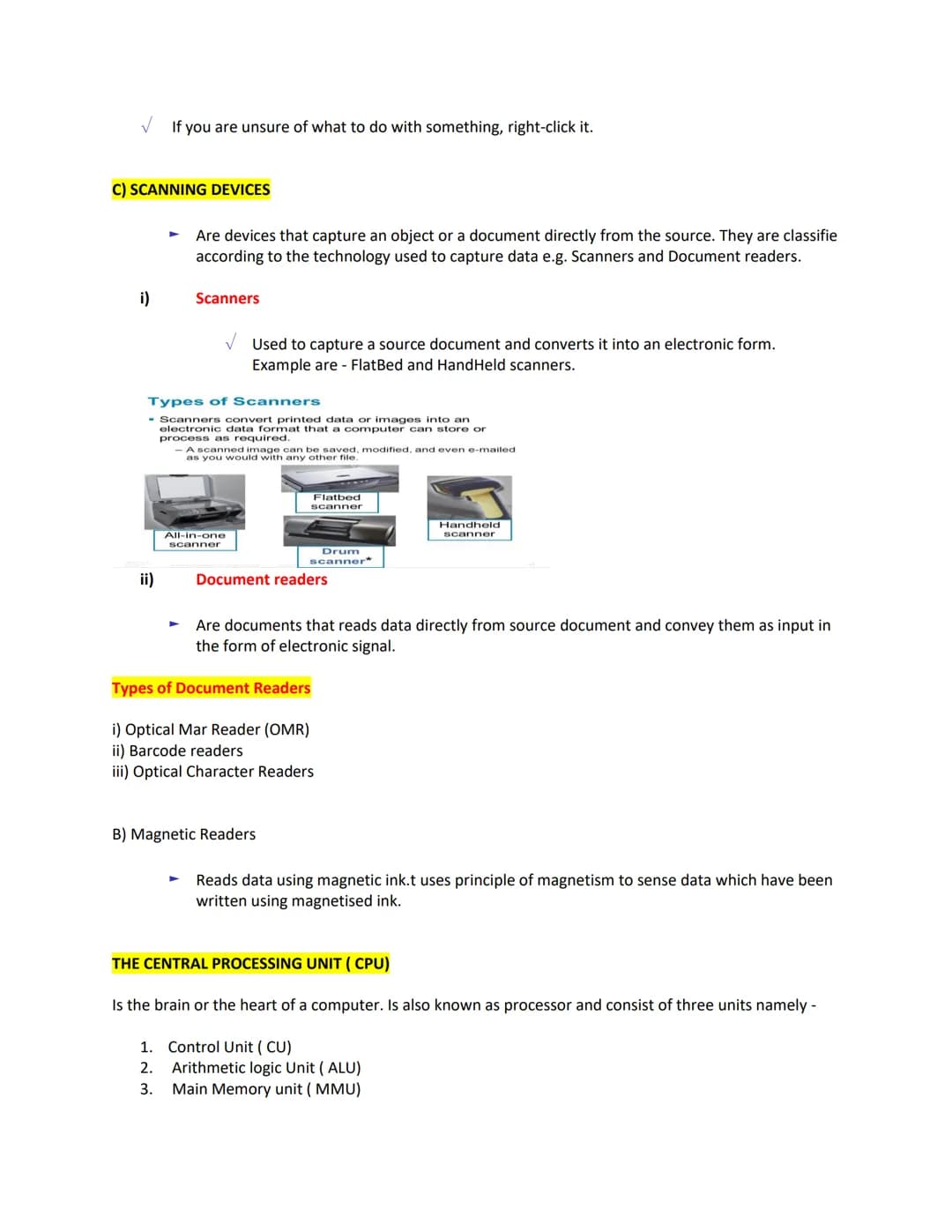
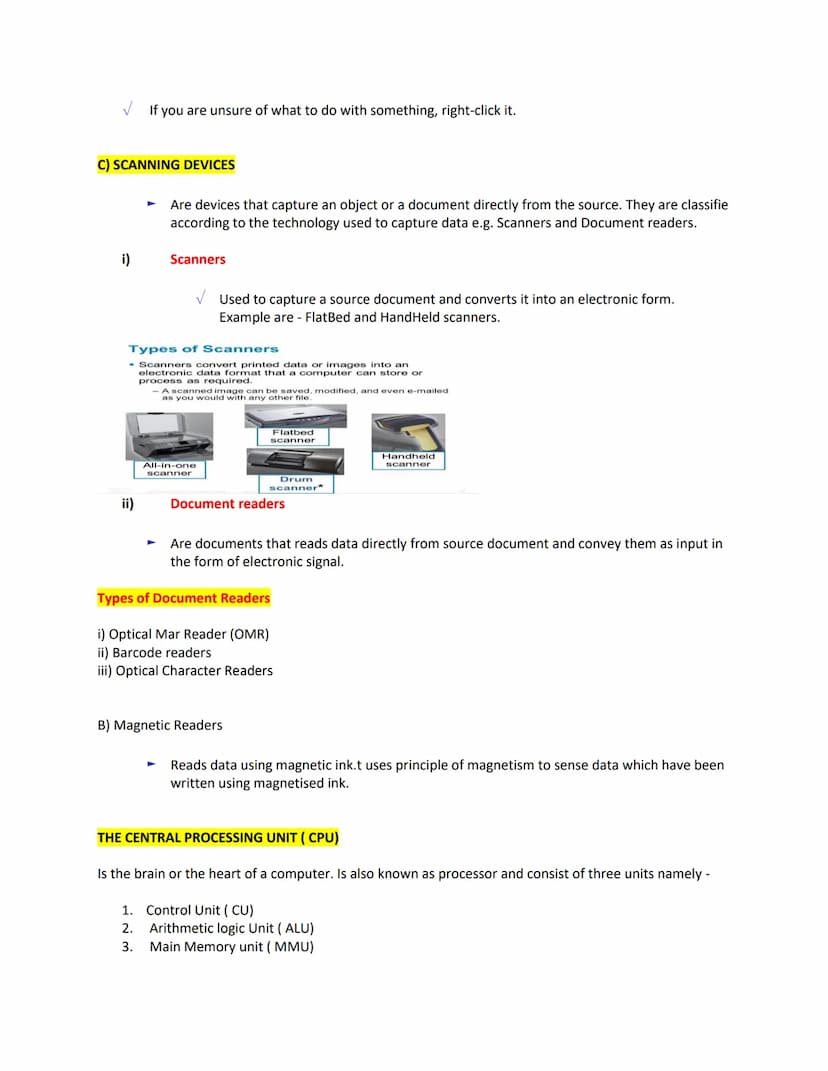
Scanning devices capture physical documents and objects directly, turning them into digital information your computer can use. These come in different forms based on their technology:
Flatbed scanners work like copy machines, capturing entire pages at once, while handheld scanners can be moved across a document. Document readers like Optical Mark Readers (OMR) process forms with filled-in bubbles (like test answer sheets), while barcode readers scan product codes in stores.
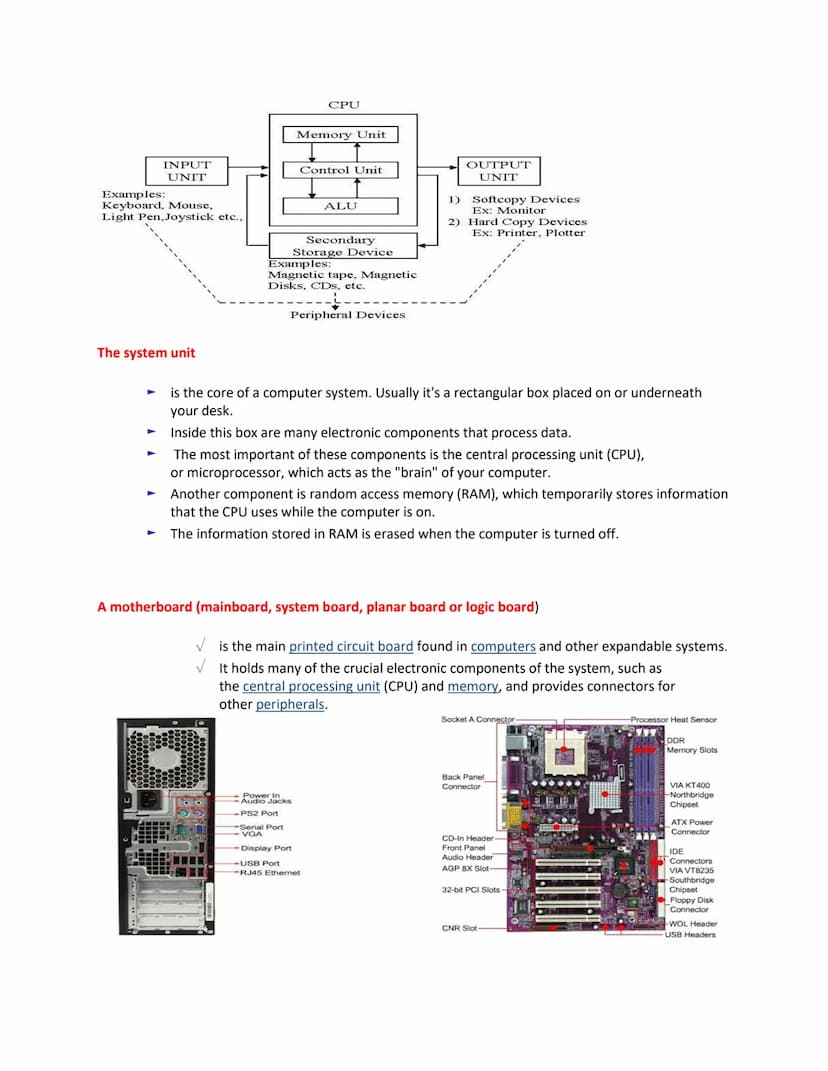
At the heart of your computer sits the Central Processing Unit (CPU)—often called the brain of the computer. This tiny but powerful chip consists of three essential units working together:
The CPU controls everything happening inside your computer, processing data, giving commands to other components, controlling memory usage, and providing both temporary (RAM) and permanent (ROM) storage solutions.
💻 Think of it this way: The CPU is like a chef in a kitchen—it reads the recipe (instructions), gathers ingredients (data), prepares the dish (processing), and serves it up (output)—all while coordinating the entire kitchen staff (other components).
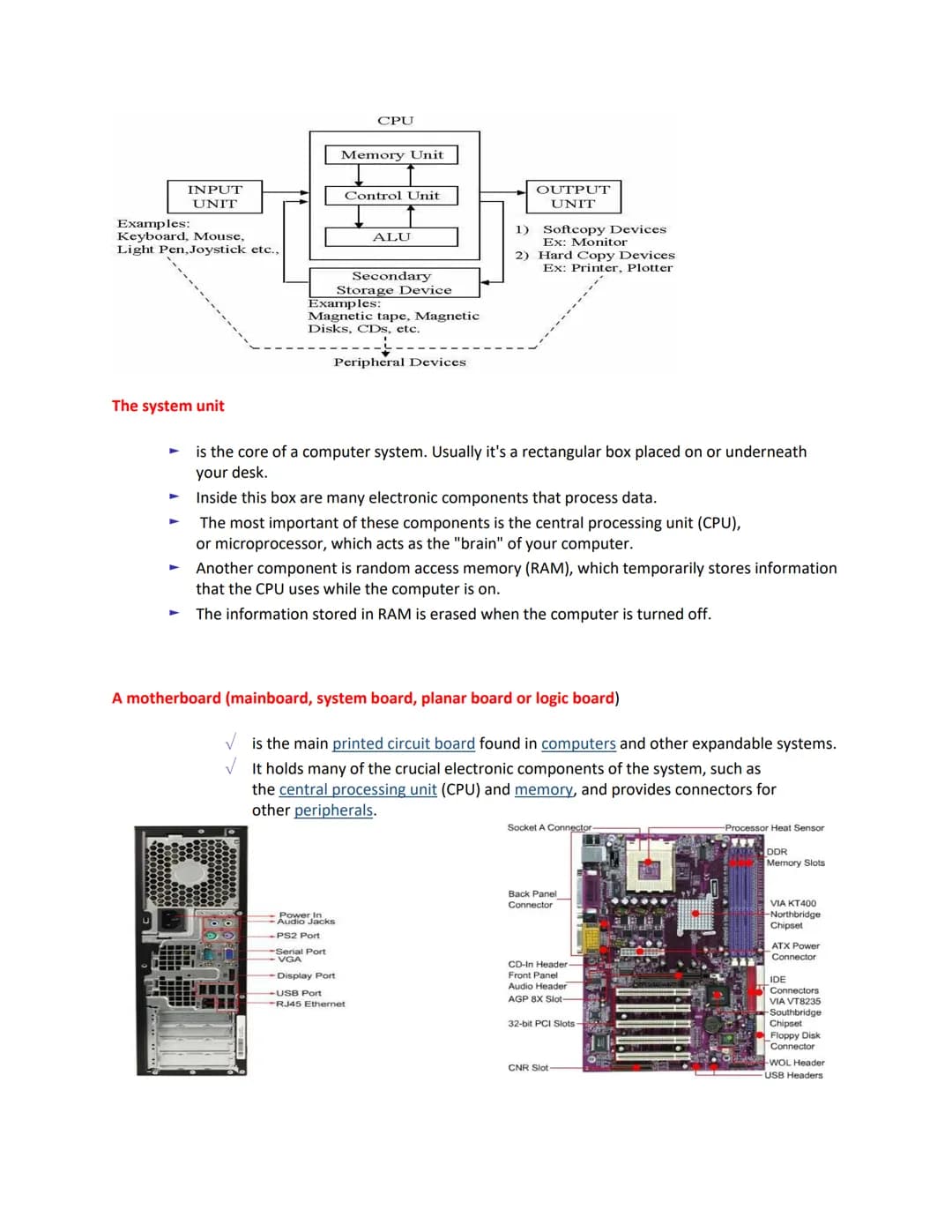
The system unit is that rectangular box that forms the main body of your computer. While it might look plain from the outside, inside is where all the magic happens—it contains the electronic components that process all your data.
The most critical component inside is the Central Processing Unit (CPU), which works as your computer's brain. Another vital component is Random Access Memory (RAM), which temporarily stores information the CPU is actively using. Remember, anything in RAM disappears when you turn off your computer!
The motherboard is the main circuit board everything else connects to—like a city's street system connecting all the important buildings. This large, flat board holds crucial components including:
All these parts work together, allowing data to flow between components through the motherboard's circuits—like information highways connecting every part of your computer system.
🔍 Inside look: If you could shrink yourself and stand on a motherboard, you'd see what looks like a miniature city, with components connected by tiny "roads" made of copper that carry electrical signals between parts.
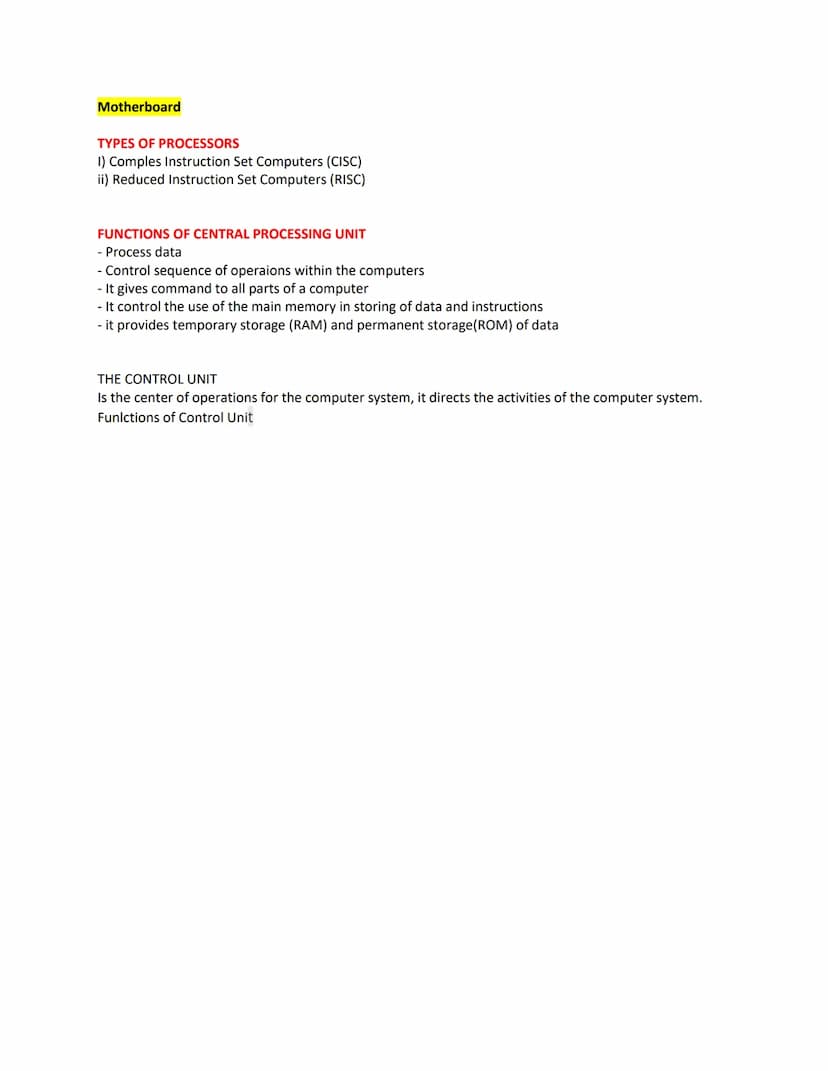
Modern processors come in two main architectural types, each with different approaches to handling instructions:
Complex Instruction Set Computers (CISC) processors can perform many operations with a single instruction, making programming simpler but potentially using more processing power. Most personal computers use CISC architecture.
Reduced Instruction Set Computers (RISC) processors use simpler, more streamlined instructions that execute faster. While they may need more lines of code to accomplish tasks, they often work more efficiently. Many mobile devices use RISC architecture.
Your CPU handles several crucial functions that keep your entire computer system running smoothly:
The Control Unit acts as the supervisor of the entire computer system, directing activities and ensuring everything happens in the correct sequence.
🧠 CPU power: Modern CPUs can perform billions of calculations per second! This incredible speed is what allows your computer to handle everything from simple word processing to complex video games simultaneously.
Our AI companion is specifically built for the needs of students. Based on the millions of content pieces we have on the platform we can provide truly meaningful and relevant answers to students. But its not only about answers, the companion is even more about guiding students through their daily learning challenges, with personalised study plans, quizzes or content pieces in the chat and 100% personalisation based on the students skills and developments.
You can download the app in the Google Play Store and in the Apple App Store.
That's right! Enjoy free access to study content, connect with fellow students, and get instant help – all at your fingertips.
App Store
Google Play
The app is very easy to use and well designed. I have found everything I was looking for so far and have been able to learn a lot from the presentations! I will definitely use the app for a class assignment! And of course it also helps a lot as an inspiration.
Stefan S
iOS user
This app is really great. There are so many study notes and help [...]. My problem subject is French, for example, and the app has so many options for help. Thanks to this app, I have improved my French. I would recommend it to anyone.
Samantha Klich
Android user
Wow, I am really amazed. I just tried the app because I've seen it advertised many times and was absolutely stunned. This app is THE HELP you want for school and above all, it offers so many things, such as workouts and fact sheets, which have been VERY helpful to me personally.
Anna
iOS user
I think it’s very much worth it and you’ll end up using it a lot once you get the hang of it and even after looking at others notes you can still ask your Artificial intelligence buddy the question and ask to simplify it if you still don’t get it!!! In the end I think it’s worth it 😊👍 ⚠️Also DID I MENTION ITS FREEE YOU DON’T HAVE TO PAY FOR ANYTHING AND STILL GET YOUR GRADES IN PERFECTLY❗️❗️⚠️
Thomas R
iOS user
Knowunity is the BEST app I’ve used in a minute. This is not an ai review or anything this is genuinely coming from a 7th grade student (I know 2011 im young) but dude this app is a 10/10 i have maintained a 3.8 gpa and have plenty of time for gaming. I love it and my mom is just happy I got good grades
Brad T
Android user
Not only did it help me find the answer but it also showed me alternative ways to solve it. I was horrible in math and science but now I have an a in both subjects. Thanks for the help🤍🤍
David K
iOS user
The app's just great! All I have to do is enter the topic in the search bar and I get the response real fast. I don't have to watch 10 YouTube videos to understand something, so I'm saving my time. Highly recommended!
Sudenaz Ocak
Android user
In school I was really bad at maths but thanks to the app, I am doing better now. I am so grateful that you made the app.
Greenlight Bonnie
Android user
I found this app a couple years ago and it has only gotten better since then. I really love it because it can help with written questions and photo questions. Also, it can find study guides that other people have made as well as flashcard sets and practice tests. The free version is also amazing for students who might not be able to afford it. Would 100% recommend
Aubrey
iOS user
Best app if you're in Highschool or Junior high. I have been using this app for 2 school years and it's the best, it's good if you don't have anyone to help you with school work.😋🩷🎀
Marco B
iOS user
THE QUIZES AND FLASHCARDS ARE SO USEFUL AND I LOVE Knowunity AI. IT ALSO IS LITREALLY LIKE CHATGPT BUT SMARTER!! HELPED ME WITH MY MASCARA PROBLEMS TOO!! AS WELL AS MY REAL SUBJECTS ! DUHHH 😍😁😲🤑💗✨🎀😮
Elisha
iOS user
This app is phenomenal down to the correct info and the various topics you can study! I greatly recommend it for people who struggle with procrastination and those who need homework help. It has been perfectly accurate for world 1 history as far as I’ve seen! Geometry too!
Paul T
iOS user
The app is very easy to use and well designed. I have found everything I was looking for so far and have been able to learn a lot from the presentations! I will definitely use the app for a class assignment! And of course it also helps a lot as an inspiration.
Stefan S
iOS user
This app is really great. There are so many study notes and help [...]. My problem subject is French, for example, and the app has so many options for help. Thanks to this app, I have improved my French. I would recommend it to anyone.
Samantha Klich
Android user
Wow, I am really amazed. I just tried the app because I've seen it advertised many times and was absolutely stunned. This app is THE HELP you want for school and above all, it offers so many things, such as workouts and fact sheets, which have been VERY helpful to me personally.
Anna
iOS user
I think it’s very much worth it and you’ll end up using it a lot once you get the hang of it and even after looking at others notes you can still ask your Artificial intelligence buddy the question and ask to simplify it if you still don’t get it!!! In the end I think it’s worth it 😊👍 ⚠️Also DID I MENTION ITS FREEE YOU DON’T HAVE TO PAY FOR ANYTHING AND STILL GET YOUR GRADES IN PERFECTLY❗️❗️⚠️
Thomas R
iOS user
Knowunity is the BEST app I’ve used in a minute. This is not an ai review or anything this is genuinely coming from a 7th grade student (I know 2011 im young) but dude this app is a 10/10 i have maintained a 3.8 gpa and have plenty of time for gaming. I love it and my mom is just happy I got good grades
Brad T
Android user
Not only did it help me find the answer but it also showed me alternative ways to solve it. I was horrible in math and science but now I have an a in both subjects. Thanks for the help🤍🤍
David K
iOS user
The app's just great! All I have to do is enter the topic in the search bar and I get the response real fast. I don't have to watch 10 YouTube videos to understand something, so I'm saving my time. Highly recommended!
Sudenaz Ocak
Android user
In school I was really bad at maths but thanks to the app, I am doing better now. I am so grateful that you made the app.
Greenlight Bonnie
Android user
I found this app a couple years ago and it has only gotten better since then. I really love it because it can help with written questions and photo questions. Also, it can find study guides that other people have made as well as flashcard sets and practice tests. The free version is also amazing for students who might not be able to afford it. Would 100% recommend
Aubrey
iOS user
Best app if you're in Highschool or Junior high. I have been using this app for 2 school years and it's the best, it's good if you don't have anyone to help you with school work.😋🩷🎀
Marco B
iOS user
THE QUIZES AND FLASHCARDS ARE SO USEFUL AND I LOVE Knowunity AI. IT ALSO IS LITREALLY LIKE CHATGPT BUT SMARTER!! HELPED ME WITH MY MASCARA PROBLEMS TOO!! AS WELL AS MY REAL SUBJECTS ! DUHHH 😍😁😲🤑💗✨🎀😮
Elisha
iOS user
This app is phenomenal down to the correct info and the various topics you can study! I greatly recommend it for people who struggle with procrastination and those who need homework help. It has been perfectly accurate for world 1 history as far as I’ve seen! Geometry too!
Paul T
iOS user
Ann Villamor
@annevillamor_sun
A computer system is a collection of hardware, software, and liveware (users) working together to process and present information. Understanding how these components interact is essential for anyone using technology in school or daily life.
Access to all documents
Improve your grades
Join milions of students
Ever wonder what makes your computer actually work? A computer system is more than just the machine on your desk—it's a collection of hardware, software, and liveware (humans!) designed to process and present information in useful ways.
The system has three main components. Computer hardware refers to the physical parts you can touch, like input devices, output devices, and the central processing unit. Computer software includes programs and applications that tell the hardware what to do, falling into two categories: system software and application software.
Don't forget the most important part—you! Liveware (also called orgware or humanware) refers to the computer user who gives commands to the system. Without users, computers would just be expensive paperweights.
💡 Quick Fact: Hardware provides five essential functions: input, processing, storage, output, and communication—each part working together to make your digital experience possible.
Access to all documents
Improve your grades
Join milions of students
Think of your computer as a team of specialized players, each with a specific job. Computer hardware falls into five main functional parts that work together to make everything happen.
The most basic components include:
Input devices are what you use to enter data or instructions. The most common input device is the keyboard, which contains three types of keys: alphanumeric keys (letters, numbers, symbols), special keys (Shift, Ctrl, Alt), and function keys .
When you press a key, the keyboard creates an electronic signal that's converted into a binary code the computer can understand. While there are many keyboard types, the standard 101-key keyboard remains the most widely used.
🔑 Remember this: Every input device, whether simple like a keyboard or advanced like a touchscreen, serves the same purpose—translating your human actions into language the computer understands.
Access to all documents
Improve your grades
Join milions of students
Your keyboard is organized into functional groups to make computing easier. The typing keys include all the letters, numbers, and symbols found on traditional typewriters. Special control keys like CTRL, ALT, and ESC are used alone or in combination to perform specific actions.
Function keys perform different tasks depending on the program you're using. Navigation keys help you move around documents and edit text, while the numeric keypad makes entering numbers quick and easy—just like on a calculator!
Beyond keyboards, pointing devices let you interact with on-screen items directly. The most common is the mouse, which lets you point to and select items on your screen. Using a mouse becomes second nature once you learn its four basic actions:
👉 Pro tip: When you're not sure what to do with something on your screen, try right-clicking it! This almost always reveals a menu of useful options specific to whatever you clicked on.
Access to all documents
Improve your grades
Join milions of students
Your mouse is a small but mighty tool for interacting with your computer. It's typically connected by a wire (though wireless versions are common now) and has two main buttons—a primary (left) button and secondary (right) button.
Learning proper mouse technique is important for comfortable computing. Rest your palm on the base with your index finger on the left button and middle finger on the right button. Your thumb stays along the side for stability and control as you move the mouse around.
The four basic mouse actions—clicking, double-clicking, right-clicking and dragging—become your go-to moves for nearly everything you do on a computer. Clicking selects items, double-clicking opens them, right-clicking shows options, and dragging moves things around.
When double-clicking, make sure your clicks are quick and your mouse doesn't move between clicks. If they're too far apart, the computer might interpret them as two separate clicks instead of one double-click.
🖱️ Mouse mastery: For most people, becoming comfortable with a mouse takes practice. If you're new to using one, try simple games like Solitaire that require pointing and clicking to build your coordination skills.
Access to all documents
Improve your grades
Join milions of students
Scanning devices capture physical documents and objects directly, turning them into digital information your computer can use. These come in different forms based on their technology:
Flatbed scanners work like copy machines, capturing entire pages at once, while handheld scanners can be moved across a document. Document readers like Optical Mark Readers (OMR) process forms with filled-in bubbles (like test answer sheets), while barcode readers scan product codes in stores.
At the heart of your computer sits the Central Processing Unit (CPU)—often called the brain of the computer. This tiny but powerful chip consists of three essential units working together:
The CPU controls everything happening inside your computer, processing data, giving commands to other components, controlling memory usage, and providing both temporary (RAM) and permanent (ROM) storage solutions.
💻 Think of it this way: The CPU is like a chef in a kitchen—it reads the recipe (instructions), gathers ingredients (data), prepares the dish (processing), and serves it up (output)—all while coordinating the entire kitchen staff (other components).
Access to all documents
Improve your grades
Join milions of students
The system unit is that rectangular box that forms the main body of your computer. While it might look plain from the outside, inside is where all the magic happens—it contains the electronic components that process all your data.
The most critical component inside is the Central Processing Unit (CPU), which works as your computer's brain. Another vital component is Random Access Memory (RAM), which temporarily stores information the CPU is actively using. Remember, anything in RAM disappears when you turn off your computer!
The motherboard is the main circuit board everything else connects to—like a city's street system connecting all the important buildings. This large, flat board holds crucial components including:
All these parts work together, allowing data to flow between components through the motherboard's circuits—like information highways connecting every part of your computer system.
🔍 Inside look: If you could shrink yourself and stand on a motherboard, you'd see what looks like a miniature city, with components connected by tiny "roads" made of copper that carry electrical signals between parts.
Access to all documents
Improve your grades
Join milions of students
Modern processors come in two main architectural types, each with different approaches to handling instructions:
Complex Instruction Set Computers (CISC) processors can perform many operations with a single instruction, making programming simpler but potentially using more processing power. Most personal computers use CISC architecture.
Reduced Instruction Set Computers (RISC) processors use simpler, more streamlined instructions that execute faster. While they may need more lines of code to accomplish tasks, they often work more efficiently. Many mobile devices use RISC architecture.
Your CPU handles several crucial functions that keep your entire computer system running smoothly:
The Control Unit acts as the supervisor of the entire computer system, directing activities and ensuring everything happens in the correct sequence.
🧠 CPU power: Modern CPUs can perform billions of calculations per second! This incredible speed is what allows your computer to handle everything from simple word processing to complex video games simultaneously.
Our AI companion is specifically built for the needs of students. Based on the millions of content pieces we have on the platform we can provide truly meaningful and relevant answers to students. But its not only about answers, the companion is even more about guiding students through their daily learning challenges, with personalised study plans, quizzes or content pieces in the chat and 100% personalisation based on the students skills and developments.
You can download the app in the Google Play Store and in the Apple App Store.
That's right! Enjoy free access to study content, connect with fellow students, and get instant help – all at your fingertips.
2
Smart Tools NEW
Transform this note into: ✓ 50+ Practice Questions ✓ Interactive Flashcards ✓ Full Practice Test ✓ Essay Outlines
App Store
Google Play
The app is very easy to use and well designed. I have found everything I was looking for so far and have been able to learn a lot from the presentations! I will definitely use the app for a class assignment! And of course it also helps a lot as an inspiration.
Stefan S
iOS user
This app is really great. There are so many study notes and help [...]. My problem subject is French, for example, and the app has so many options for help. Thanks to this app, I have improved my French. I would recommend it to anyone.
Samantha Klich
Android user
Wow, I am really amazed. I just tried the app because I've seen it advertised many times and was absolutely stunned. This app is THE HELP you want for school and above all, it offers so many things, such as workouts and fact sheets, which have been VERY helpful to me personally.
Anna
iOS user
I think it’s very much worth it and you’ll end up using it a lot once you get the hang of it and even after looking at others notes you can still ask your Artificial intelligence buddy the question and ask to simplify it if you still don’t get it!!! In the end I think it’s worth it 😊👍 ⚠️Also DID I MENTION ITS FREEE YOU DON’T HAVE TO PAY FOR ANYTHING AND STILL GET YOUR GRADES IN PERFECTLY❗️❗️⚠️
Thomas R
iOS user
Knowunity is the BEST app I’ve used in a minute. This is not an ai review or anything this is genuinely coming from a 7th grade student (I know 2011 im young) but dude this app is a 10/10 i have maintained a 3.8 gpa and have plenty of time for gaming. I love it and my mom is just happy I got good grades
Brad T
Android user
Not only did it help me find the answer but it also showed me alternative ways to solve it. I was horrible in math and science but now I have an a in both subjects. Thanks for the help🤍🤍
David K
iOS user
The app's just great! All I have to do is enter the topic in the search bar and I get the response real fast. I don't have to watch 10 YouTube videos to understand something, so I'm saving my time. Highly recommended!
Sudenaz Ocak
Android user
In school I was really bad at maths but thanks to the app, I am doing better now. I am so grateful that you made the app.
Greenlight Bonnie
Android user
I found this app a couple years ago and it has only gotten better since then. I really love it because it can help with written questions and photo questions. Also, it can find study guides that other people have made as well as flashcard sets and practice tests. The free version is also amazing for students who might not be able to afford it. Would 100% recommend
Aubrey
iOS user
Best app if you're in Highschool or Junior high. I have been using this app for 2 school years and it's the best, it's good if you don't have anyone to help you with school work.😋🩷🎀
Marco B
iOS user
THE QUIZES AND FLASHCARDS ARE SO USEFUL AND I LOVE Knowunity AI. IT ALSO IS LITREALLY LIKE CHATGPT BUT SMARTER!! HELPED ME WITH MY MASCARA PROBLEMS TOO!! AS WELL AS MY REAL SUBJECTS ! DUHHH 😍😁😲🤑💗✨🎀😮
Elisha
iOS user
This app is phenomenal down to the correct info and the various topics you can study! I greatly recommend it for people who struggle with procrastination and those who need homework help. It has been perfectly accurate for world 1 history as far as I’ve seen! Geometry too!
Paul T
iOS user
The app is very easy to use and well designed. I have found everything I was looking for so far and have been able to learn a lot from the presentations! I will definitely use the app for a class assignment! And of course it also helps a lot as an inspiration.
Stefan S
iOS user
This app is really great. There are so many study notes and help [...]. My problem subject is French, for example, and the app has so many options for help. Thanks to this app, I have improved my French. I would recommend it to anyone.
Samantha Klich
Android user
Wow, I am really amazed. I just tried the app because I've seen it advertised many times and was absolutely stunned. This app is THE HELP you want for school and above all, it offers so many things, such as workouts and fact sheets, which have been VERY helpful to me personally.
Anna
iOS user
I think it’s very much worth it and you’ll end up using it a lot once you get the hang of it and even after looking at others notes you can still ask your Artificial intelligence buddy the question and ask to simplify it if you still don’t get it!!! In the end I think it’s worth it 😊👍 ⚠️Also DID I MENTION ITS FREEE YOU DON’T HAVE TO PAY FOR ANYTHING AND STILL GET YOUR GRADES IN PERFECTLY❗️❗️⚠️
Thomas R
iOS user
Knowunity is the BEST app I’ve used in a minute. This is not an ai review or anything this is genuinely coming from a 7th grade student (I know 2011 im young) but dude this app is a 10/10 i have maintained a 3.8 gpa and have plenty of time for gaming. I love it and my mom is just happy I got good grades
Brad T
Android user
Not only did it help me find the answer but it also showed me alternative ways to solve it. I was horrible in math and science but now I have an a in both subjects. Thanks for the help🤍🤍
David K
iOS user
The app's just great! All I have to do is enter the topic in the search bar and I get the response real fast. I don't have to watch 10 YouTube videos to understand something, so I'm saving my time. Highly recommended!
Sudenaz Ocak
Android user
In school I was really bad at maths but thanks to the app, I am doing better now. I am so grateful that you made the app.
Greenlight Bonnie
Android user
I found this app a couple years ago and it has only gotten better since then. I really love it because it can help with written questions and photo questions. Also, it can find study guides that other people have made as well as flashcard sets and practice tests. The free version is also amazing for students who might not be able to afford it. Would 100% recommend
Aubrey
iOS user
Best app if you're in Highschool or Junior high. I have been using this app for 2 school years and it's the best, it's good if you don't have anyone to help you with school work.😋🩷🎀
Marco B
iOS user
THE QUIZES AND FLASHCARDS ARE SO USEFUL AND I LOVE Knowunity AI. IT ALSO IS LITREALLY LIKE CHATGPT BUT SMARTER!! HELPED ME WITH MY MASCARA PROBLEMS TOO!! AS WELL AS MY REAL SUBJECTS ! DUHHH 😍😁😲🤑💗✨🎀😮
Elisha
iOS user
This app is phenomenal down to the correct info and the various topics you can study! I greatly recommend it for people who struggle with procrastination and those who need homework help. It has been perfectly accurate for world 1 history as far as I’ve seen! Geometry too!
Paul T
iOS user